claude agent mcp rate limit texting
By Beam team · Updated
Handling Beam's MCP Rate Limit in a Custom Claude Agent
Beam enforces the same 60 requests-per-minute ceiling per Bearer token whether your custom Claude agent calls REST endpoints like /v1/messages directly or reaches the same tools through the /v2/tools MCP catalog. For a high-volume programmatic sender, call REST directly: it is one fewer moving part, and you still write your own backoff logic either way, since Beam's limit sits outside anything the Anthropic SDK's own retry handling touches.
Beam is an independent messaging platform, not an Anthropic or Apple product.
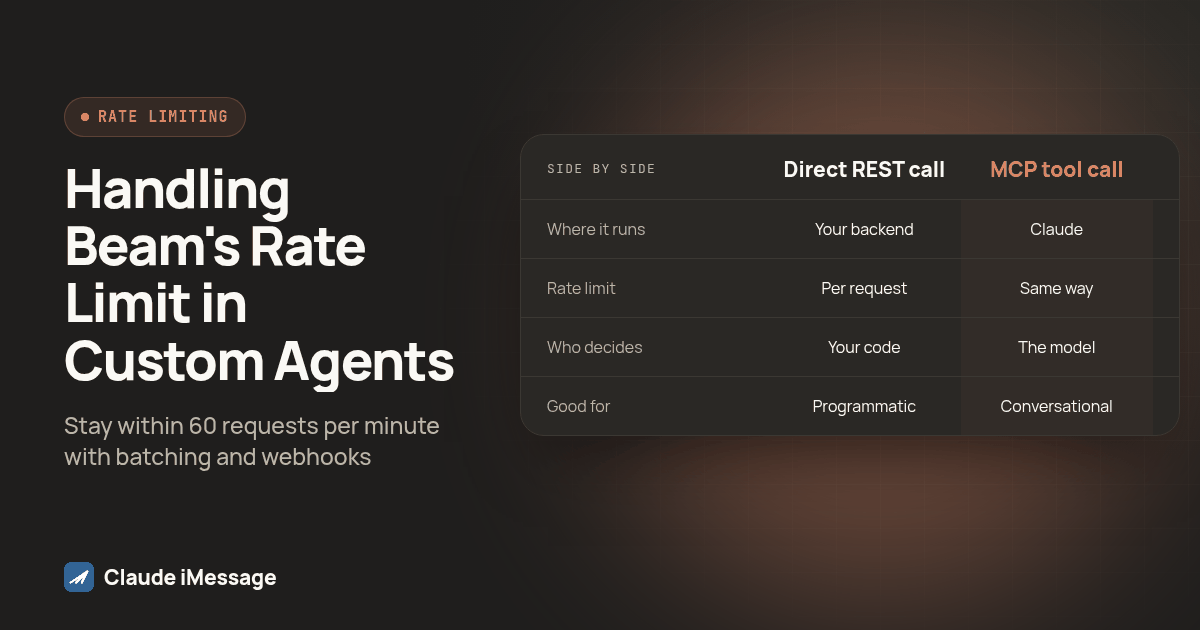
What's the actual difference between Beam's REST endpoints and its MCP tool catalog?
This is for the case where you are writing application code against Claude's API yourself, not using Claude Desktop, Claude Code, or the custom connector dialog inside claude.ai. Those three clients already have documented, built-in paths to Beam, covered separately in our guides to the Claude Desktop stdio bridge, Claude Code's MCP registration command, and the bearer-token custom connector. None of those apply once you are writing the agent loop yourself and deciding how your own backend talks to Beam, which is the gap this guide fills, verified against Beam's developer access reference and Anthropic's MCP connector documentation as of this writing.
Beam gives a developer exactly two documented ways into the same workspace, and both take the identical Bearer token. The REST layer is a set of plain HTTP endpoints, POST /v1/messages to send, GET /v1/messages/:id to check status, DELETE /v1/messages/:id to cancel a queued send, and similar routes for contacts, numbers, and conversation history. Your application code calls these directly with an ordinary HTTP client, the same way it would call any other REST API, and reads back ordinary JSON.
The MCP catalog is a second surface on the same workspace, not a separate product. GET /v2/tools returns the tools and argument schemas your token can call, and POST /v2/tools executes one of them, using the same Bearer token as the MCP endpoint at https://beam.aisync.link/mcp itself, per our iMessage MCP server guide. The tool names map closely to the REST actions, message_send does roughly what POST /v1/messages does, so what differs is the calling convention, not the destination. If your backend decides when to send, in response to a webhook, a cron job, or a queue message, you are writing REST calls whether or not you dress them up as MCP tools. If Claude itself is reasoning about whether to text someone right now mid-conversation, MCP tool calls are the natural fit, since that is what gives the model a schema it can reason over.
Why does a busy agent loop burn through 60 requests a minute so fast?
Sixty requests a minute sounds generous until you count what one real turn costs. A single agent turn that reads a conversation, drafts a reply, pauses Beam's own assistant so it does not answer the same message twice, and then sends, is already three or four calls before the model writes a word back: conversation_read, conversation_pause, message_send, maybe a contacts_list lookup too. Run that across a handful of simultaneous conversations and you are well past 60 calls inside a minute, because the ceiling is shared across the whole token rather than split per conversation, the exact multiplication Peliqan's guide to MCP rate limits describes as the usual way a tool-calling loop outruns itself.
Polling makes this worse in a way that is easy to miss during development. A loop that checks GET /v1/messages/:id every second looks harmless against one test conversation and looks like a denial-of-service attempt on your own token once ten real conversations run it at once. Beam's own guidance is explicit: use event webhooks for anything event-driven rather than tight polling, since the limit of 60 requests per minute per token applies regardless of how the calls are shaped. Polling is not against the rules; it is just the fastest documented way to spend your whole budget on bookkeeping instead of on sends. Independent coverage agrees this is a general MCP pattern, not a Beam quirk: Zuplo's piece on why you should never ship an MCP server without a rate limit calls this kind of agent-loop multiplication one of the most common production failures once a demo turns into real traffic (Zuplo).
Should a high-volume custom agent call REST directly or go through MCP?
For a programmatic sender, meaning your backend decides when to text someone rather than Claude deciding mid-conversation, calling REST directly is the simpler path, and the rate limit does not change that answer, since it applies identically either way. The real reasons to prefer REST here are operational: you control retries, timeouts, and logging with your own HTTP client, instead of paying for a tool-schema round trip just to make a call your own code already knows it needs to make.
MCP earns its place when Claude itself decides whether and when to act, a genuinely different job from a backend firing a send on a schedule. If your agent reads a customer's incoming message and reasons about whether to reply, escalate, or wait, giving it message_send and conversation_read as tools through MCP lets it make that call directly rather than your code pre-encoding every branch of that judgment.
| Direct REST call | MCP tool call | |
|---|---|---|
| Where it runs | Your application code, calling https://beam.aisync.link/v1/messages and similar routes directly |
Claude itself, through a tool schema, either via a self-hosted MCP client loop or Anthropic's server-side MCP connector |
| How the 60/min limit applies | Counted per request against your Bearer token, same as any REST call | Counted exactly the same way; the MCP layer does not add or remove any headroom |
| Who decides to make the call | Your backend code, deterministically | The model, as part of reasoning over the conversation |
| Retry and backoff | You write it, same as any HTTP client code | You still write it; neither a self-hosted MCP client nor Anthropic's connector backs off for you automatically on Beam's side |
| Good fit for | A high-volume programmatic sender: webhooks, queues, scheduled sends | A conversational agent judging whether and when to act mid-turn |
Anthropic's own MCP connector, the server-side feature letting Claude call a remote MCP server without you running a client loop yourself, is a real third option if you lean toward MCP. It requires declaring the server with mcp_servers and adding a matching mcp_toolset entry under tools, under a current beta header, or the request is rejected outright (platform.claude.com: MCP connector). That still sends the same request to Beam's endpoint under the hood, so it inherits the 60-per-minute ceiling exactly like a client you host yourself; choosing it is a question of who manages the connection, not a way around the limit.
Why isn't an OAuth-only connector an option for this kind of agent?
Beam issues one credential type for this integration: a Bearer token created in Beam Settings, under Developer access, MCP & API, by a workspace owner. That token is what both the REST endpoints and the MCP endpoint expect in an Authorization: Bearer header. Beam's own connector documentation states this plainly: OAuth-only hosted connectors are not supported by this release, so a client expecting to broker an OAuth sign-in flow for a remote MCP server has nothing to negotiate with on Beam's side.
That is rarely an obstacle for custom agent code, since you were never wiring an OAuth screen into your own backend anyway. Create the token once, store it as a secret, and send it on every request like any other API key. The limitation mainly affects hosted dialogs built around the assumption that every remote MCP server supports a sign-in flow, not application code already managing a static credential.
When should the agent batch requests or back off instead of retrying?
Treat 60 requests a minute as a budget to spend deliberately, not a wall to slam into and bounce off of. Default to event webhooks and reserve polling for the rare case where you genuinely need a live answer right now, since a webhook push on message.received costs nothing against the ceiling, as Beam is the one calling your endpoint instead of you calling Beam's. Where a tool already returns more than you asked for, use that instead of asking again: conversation_read already returns the latest 50 messages in one call, so reading history message by message wastes requests on something a single call already covers. Give each workload its own token rather than sharing one across everything the agent does, since the limit is scoped per token, and a nightly batch job sharing a token with a live conversational agent can starve each other during a burst.
On the retry side, back off on a real schedule rather than a tight retry: a failed call should wait progressively longer before the next attempt, not fire again immediately. And never retry a write by minting a new idempotency key just to dodge a throttling error. Every write needs a unique request_key, and reusing that same key returns the stored result instead of repeating the action, so a fresh key on retry risks sending the same text twice.
Here is the shape of a simple limiter wrapping a direct REST call, written to keep the request rate under the ceiling instead of discovering it the hard way:
const BASE_URL = "https://beam.aisync.link";
const MAX_PER_MINUTE = 60;
const WINDOW_MS = 60_000;
let timestamps: number[] = [];

async function callBeam(path: string, init: RequestInit) {
  const now = Date.now();
  timestamps = timestamps.filter((t) => now - t < WINDOW_MS);
  if (timestamps.length >= MAX_PER_MINUTE) {
    const waitMs = WINDOW_MS - (now - timestamps[0]);
    await new Promise((r) => setTimeout(r, waitMs));
  }
  timestamps.push(Date.now());
  const res = await fetch(BASE_URL + path, init);
  if (res.status === 429 || res.status >= 500) {
    await new Promise((r) => setTimeout(r, 2000));
    return callBeam(path, init);
  }
  return res;
}
This is deliberately plain: a sliding window in memory, a wait before any call that would exceed it, one retry with a short pause on a throttling or server error. A production agent will want that window shared across processes rather than held in one array.
How do you test that a production agent handles a 429 correctly before go-live?
Beam's own errors and statuses reference names 400, 401, 403, 404, 409, and 502 explicitly, without singling out one code for the ceiling itself. Build and test your agent to treat any throttling-shaped response the same way: a 429, or a 5xx that shows up only once you send in bursts, is a signal to pause and resume below the ceiling, not a bug to retry instantly.
- Write a short burst script that calls your wrapped Beam function fast enough, inside a single minute, to cross the documented per-minute ceiling, against a test contact you control, not a real customer.
- Confirm the limiter holds the line by logging a timestamp on every outgoing call and checking that no rolling one-minute window crosses that ceiling, rather than trusting the code because it compiled.
- Force a throttling response deliberately, or lower the limiter's own ceiling temporarily so the burst script reliably crosses it, so you see the real backoff path execute instead of assuming it from the code.
- Check the backoff delay grows on repeated throttling rather than firing again immediately, and that the call eventually succeeds once the window clears.
- Verify no duplicate text went out, checking Beam's own activity log against the distinct
request_keyvalues used during the test, confirming retries reused keys instead of minting new ones. - Confirm a genuinely failed request, like a 403 from an opted-out contact, still surfaces as a real error rather than getting swallowed by the same backoff logic built for throttling.
- Re-run the burst test after any change to the agent loop that adds a tool call per turn, since that is exactly the kind of change that quietly raises what one conversation now costs.
Screenshot: a terminal pane split into two panels, the left showing the burst test script's output counting outgoing calls per rolling minute window, the right showing the agent's own log lines marking a detected throttling response followed by an increasing backoff delay before the next attempt.
Start by instrumenting whichever path you pick, REST or MCP, with a per-minute counter before writing any backoff logic, so you know how close to the ceiling a real conversation runs. For the full tool catalog and permission model behind read, train, send, and book access, see our iMessage MCP server guide; for a raw HTTP integration instead of an AI client, see our build an iMessage API integration guide. If the same agent also needs to place real outbound calls, RizzDial's own MCP connection at rizzdial.com/mcp follows the identical Bearer-token pattern.
Before you connect
What do teams ask before they connect?
Is Beam's 60 requests-per-minute limit shared across my whole workspace or scoped to one token?
It is scoped to the token, not the workspace. Beam's developer access reference states the limit as 60 requests per minute per token, so two separate tokens on the same workspace each get their own ceiling. That is why a scoped token per workload, rather than one shared token for everything your agent does, buys real headroom instead of just organizational tidiness.
Does calling Beam through Claude's own MCP connector instead of a self-hosted MCP client change how the limit applies?
No. Whichever surface makes the call, the underlying request still carries your Bearer token to Beam's servers, and Beam counts it the same way. Anthropic's server-side MCP connector and a self-run MCP client both end up calling https://beam.aisync.link directly, so the 60-per-minute ceiling applies identically either way.
Can I ask Beam to raise the 60 requests-per-minute ceiling for a high-volume production agent?
Beam's documentation does not describe a request path to raise that number for a single token. What it does document is creating more than one scoped connection token, each with its own 60-per-minute allowance, and using event webhooks instead of polling for anything that does not need a live request-response round trip. Treat those two documented options as the real levers, not a support ticket asking for an exception.
Will polling for delivery status also use up my 60 requests a minute?
Yes, a status check is a request like any other. Beam's own API reference says plainly not to poll a message's status in a tight loop, since once every few seconds is already plenty, and recommends event webhooks for anything event-driven instead of repeated polling. An agent that checks delivery after every single send burns through its ceiling on bookkeeping before it has sent much of anything.
Should a conversational agent that only sends a handful of texts a day worry about any of this?
Not much. A low-volume assistant handling a few conversations a day will rarely come close to 60 requests in any given minute, so the rate limit is mostly a non-issue for that shape of workload. This guide matters most for an agent loop that fires several tool calls per turn across many simultaneous conversations, which is the pattern that actually reaches the ceiling.
Keep exploring
Which guides go deeper?
Where do these facts come from?
Checked October 2026.