claude memory
By Beam team · Updated
Does a Claude iMessage Agent Remember Earlier Texts?
No. Claude's Chat Memory feature only runs inside claude.ai, Claude Desktop and the Claude mobile apps; it does not extend to the API, the Agent SDK or a custom MCP connection, so a Claude-powered iMessage agent you build yourself starts every new session with nothing about the contact unless your own code puts it there. The fix is not a setting to flip. It is a small per-contact memory store, keyed to the phone number, that you read before the agent answers and write to after it does.
Beam is an independent messaging platform, not an Anthropic or Apple product.
What Does Claude's Chat Memory Feature Actually Cover?
We got this question from a developer who had just read Anthropic's own memory announcement and assumed it covered the texting agent they were already running on Beam. It does not, and the gap between what Claude remembers for a person chatting on claude.ai and what a developer-built agent remembers about a contact is wide enough that it is worth walking through exactly where that gap sits, and what to build to close it.
Claude's memory, as Anthropic describes it, saves memory as a set of individual topics while someone chats, so the next conversation on claude.ai can draw on roles, projects, preferences and working context without the person repeating themselves (support.claude.com). It is on by default for Free, Pro, Max and Ultra accounts, it is per-account rather than per-conversation, and a person can turn it off for one chat with incognito mode or skip saving a sensitive topic. Anthropic's own support article is specific about where this stops: memory does not extend to API usage or custom integrations. That line is the entire answer to the question at the top of this page. A texting agent built on the Agent SDK, the plain API or a custom MCP server is, by definition, API usage. It never touches the claude.ai account layer that Chat Memory lives in, no matter whose personal account that memory feature is turned on for.
That is worth saying plainly because the two products sound close enough to blur together. Chat Memory is a feature of the consumer product: claude.ai, the desktop app and the mobile apps. An iMessage agent that answers texts through Beam calls the API directly or through the Agent SDK, with its own system prompt and its own tool calls, so one developer's personal claude.ai memory setting changes nothing about what the business's texting agent knows the next time a lead replies. Worth saying here too, since the two names sit close together in this question: Beam, which claudeimessage.com runs on, is an independent messaging platform, not an Anthropic or Apple product. It fits well as a Claude agent's send and receive path, but it is not part of Anthropic's memory feature and never will be.
Why Does Every New Inbound Text Still Start a Blank Session?
Because an inbound text and a Claude session are not the same thing, and nothing connects them unless your code makes that connection on purpose. A contact who texted your business last Tuesday and texts again today produces two separate webhook events. If the handler for each event calls the Agent SDK or the API fresh, with no resume and no prior context in the prompt, Claude starts from zero both times, same as it would for two different people. The model has no built-in sense that "this phone number" means anything across those two calls.
The Agent SDK does have a real session mechanic, and it is worth understanding exactly what it does and does not give you. A session is the conversation history the SDK accumulates while an agent works, written to disk automatically so you can return to it later by its session_id (code.claude.com). Resuming that session sends the full saved transcript back to the API, so the agent has everything it had before, at the cost of resending and re-billing that whole transcript on every turn. Resuming is genuinely useful if you deliberately map one session_id to one phone number and store that mapping yourself, since the SDK has no idea a session belongs to a given contact unless your code tracks it. But a thread that runs for months grows into a transcript that is slow and expensive to resend in full just to answer one new text, which is a real limit worth planning around rather than discovering later.
Beam's own API gives a texting agent a second, often better option for building that context: GET /v1/conversations/{phone}, which returns the full message history for one contact, oldest message first, with each message's direction, channel, body and timestamp. An existing claudeimessage.com guide already covers calling this through a conversation_read MCP tool so Claude can read and reason over a thread inside one active session; see our guide on whether Claude can analyze a text thread. What that guide does not cover, and what this one does, is the part between sessions: pulling that history back out, or distilling it, so the next session does not start blank.
Chat Memory, Session Resume or a Custom Store: Which One Actually Remembers a Contact?
| Claude Chat Memory | Agent SDK session resume | Custom per-contact memory store | |
|---|---|---|---|
| Where it runs | claude.ai, Claude Desktop, Claude mobile apps | Your own process, via resume and a stored session_id |
Your own database, read and written by your own code |
| Covers API, Agent SDK or MCP agents | No, explicitly excluded | Yes, but only if you map a session to a contact yourself | Yes, that is its whole purpose |
| What gets sent back to Claude | Not applicable, it lives inside the consumer product | The entire saved transcript for that session | A short summary or fact list you choose to inject |
| Cost as the relationship ages | Not applicable | Grows, since the full transcript resends every resume | Stays roughly flat, since you control what gets kept |
| Who controls what is remembered | The person's claude.ai account settings | Whatever the transcript happened to contain | You, deliberately, at write time |
| Fits well for | A person's own ongoing claude.ai conversations | A single user working one long task across restarts | A business texting agent answering many contacts over time |
The practical read of that table: nothing in the first two columns solves a texting agent's actual problem, which is one contact texting back weeks later and the agent needing to know who they are without re-reading everything they ever sent. That is what the third column is for, and it is not complicated to build.
How Do You Build a Per-Contact Memory Store, Step by Step?
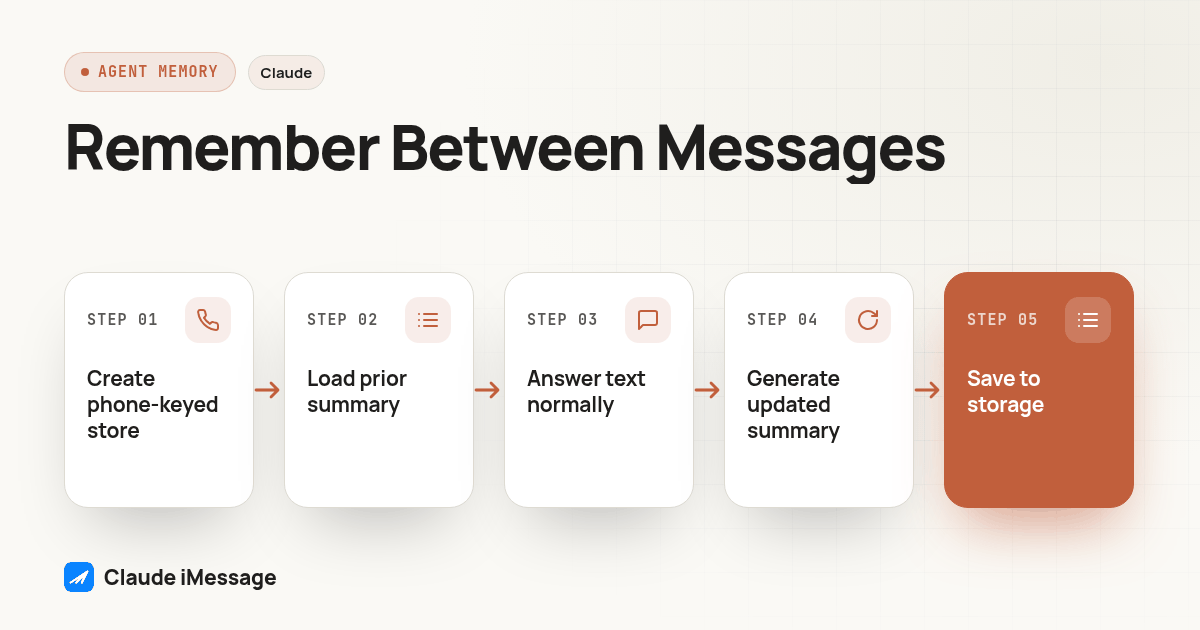
- Add one table or document store keyed by the contact's phone number, with at minimum a
summarytext field and alast_updatedtimestamp. Nothing fancier is required to start. - Before the agent's system prompt is built for an inbound text, look up that phone number in the store. If a row exists, inject its summary as a short block of context, labeled clearly as prior history rather than the current message.
- Let the agent answer the current text normally, using that injected summary the same way it would use any other fact in its context window.
- After the exchange finishes, make one small, separate Claude call whose only job is to update the summary: take the old summary plus the new exchange, and return a short, revised summary, not a running transcript.
- Write that revised summary back to the same row, overwriting the old one rather than appending to it, so the stored text stays small no matter how many times the contact has texted before.
- Cap what the summary holds to the handful of facts a human teammate would want on screen before replying: who they are, what they are trying to do, what is still open, and anything they explicitly asked not to be asked again.
- Decide a retention rule up front, such as dropping or anonymizing a summary after a stated period of no contact, and write that rule down where a teammate can find it later.
- If the agent's send tool already follows our guide to giving a Claude Agent SDK agent a send-text tool, add the memory lookup and write as two extra steps around that existing tool call, not a new pipeline.
That sequence deliberately avoids the Agent SDK's resume option for the long-term memory layer. Resume is still worth using inside a single exchange, if an agent needs several tool calls to answer one text; it is just the wrong tool for remembering a contact across a gap of days or weeks, for the cost reason covered above.
What Should the Injected Memory Block Actually Contain?
A short, copy-paste starting template for the summary you store and inject, kept deliberately plain so a non-technical reviewer could read it:
Contact: [phone number]
Who they are / what they're trying to do: [one or two sentences]
Last contact: [date]
Open items: [anything unresolved, or "none"]
Do not repeat: [anything they already said once and shouldn't be asked again]
Preferences noted: [channel, timing, tone, anything explicit]
Keep two rules in mind when filling that template in. First, write it as facts, not as a transcript; "asked about rescheduling, we offered Thursday or Friday, no answer yet" is useful, a verbatim copy of the last ten messages is not. Second, treat anything sensitive the same way any other stored customer record should be treated: keep only what the next conversation needs, and leave out anything that was shared in a moment of frustration and has no bearing on what the agent needs to do next.
How Do You Test That Memory Actually Carries Over Before Real Contacts?
- Text a number you control, have the agent reply, and confirm a summary row gets written for that number afterward, not just a successful send.
- Wait, then text the same number again from a fresh process restart, with no session resumed, and confirm the agent's reply shows it knows something from the first exchange, such as referencing what was discussed rather than asking from scratch.
- Check the actual stored summary text after that second exchange, not just the agent's reply, and confirm it grew by a sentence or two rather than by the full new transcript.
- Text from a second number you control and confirm the agent's reply to that number carries no trace of the first number's history. Cross-contact leakage here is the single most damaging bug this kind of store can have.
- Manually edit or clear one contact's stored summary, then text from that number again, and confirm the agent now answers as if meeting that contact for the first time, proving the lookup is actually driving the behavior rather than something cached elsewhere.
- Let one test thread run past your planned retention window, then confirm the summary is dropped or anonymized on schedule rather than sitting indefinitely.
Diagram: a horizontal flow showing an inbound text arriving on the left, an arrow down into a small box labeled "look up phone number in memory store," another arrow into "build system prompt with injected summary," then into "Claude replies," then an arrow out to "update and overwrite summary," looping back to the memory store box, with a separate dashed box off to the side labeled "claude.ai Chat Memory" connected to nothing on the diagram at all.
Run that sequence against a live number before anything here touches a real contact list, the same way you would test a new send tool. A memory bug that leaks one contact's details into another contact's conversation is worse than no memory at all.
Where Does This Fit Next to the Rest of the Agent?
None of this works without a reliable send and receive path to begin with. If that part is not built yet, our guide to building your own iMessage API covers setting it up; Beam's own iMessage API reference documents the endpoints used throughout this guide, including the conversation history call. If the agent is wired through a full MCP tool catalog rather than one send tool, our guide to what a texting MCP server actually exposes to Claude covers how a conversation_read-style tool shows up there. If the agent runs through Claude Code itself rather than a standalone SDK process, our Claude Code iMessage guide covers how that setup differs from the Agent SDK path above.
Before you connect
What do teams ask before they connect?
Does turning on Chat Memory in a claude.ai account change what a custom iMessage agent remembers?
No. Chat Memory is a claude.ai, Claude Desktop and Claude mobile app feature tied to a personal account. A texting agent built on the Agent SDK, the API or a custom MCP connection runs on its own API calls and never touches that account memory, so turning it on or off in the consumer apps has zero effect on what the agent remembers about a contact.
Does resuming an Agent SDK session by session_id give a texting agent the same thing as per-contact memory?
Only if every inbound text from one phone number is deliberately routed to the same stored session_id, and even then it is not the same thing. Resuming a session resends that session's full saved transcript to the API on every call, so the cost and latency grow as the thread gets longer, and nothing links a session to a phone number unless the agent's own code makes that link. A short stored summary keyed to the phone number avoids both problems.
Does adding a per-contact memory store take long to build on top of an existing Claude texting agent?
If the agent already has a working send and receive path, a basic version is usually a short project: one database table keyed by phone number, one short summarization call after each exchange, and one lookup that runs before the agent's system prompt is built. Tuning what the summary keeps and drops, and deciding how old a summary can get before it is dropped, takes longer than the initial wiring.
Does storing a running summary of someone's texts create a compliance problem?
Treat it the same as any other stored customer data: keep it to what the next conversation actually needs, give a contact a way to ask what is stored, and delete it on request. This is a data handling practice, not legal advice, and the rules that already apply to a business's text message records apply to a memory summary built from the same messages.
Keep exploring