ai text bot
By Beam team · Updated
Claude iMessage Auto-Reply Bot With Human Handoff
A Claude auto-reply bot for iMessage is three connected pieces: a webhook that receives the inbound text, a call to Claude that drafts a reply, and an outbound send that puts the reply back on the thread. The part most tutorials skip is the fourth piece, a handoff rule set that checks the incoming text and the conversation history before Claude ever gets a turn, and pulls a human in instead of letting the bot answer something it shouldn't.
Beam is an independent messaging platform, not an Anthropic or Apple product.
What Does A Claude iMessage Auto-Reply Bot Actually Need To Do?
We build and run texting bots on Claude every week, and the question we get after someone has the basic loop working is never "how do I make it reply faster." It's "how do I make it stop replying when it should." This guide walks through both: the loop itself, condensed, and then the handoff logic in full, with the specific situations that should pull a person into the thread.
Strip the branding away and an auto-reply bot on iMessage is doing three jobs in sequence. Something has to notice that a contact texted in. Something has to decide what to say back. Something has to actually put that reply on the thread. Our guide to building a Claude agent that sends real texts covers that three-part loop end to end, with a full webhook receiver and the two outbound calls it needs, so we won't repeat the whole build here.
What that guide does not cover, on purpose, is the moment a conversation stops being something Claude should answer at all. A pricing question, a reschedule request, a simple "what are your hours" message: Claude can draft a fine reply to any of those without much risk. An angry customer threatening to cancel, a question about a refund, someone explicitly asking for a person, a message that repeats itself because the bot already answered wrong once: none of those should reach Claude's turn in the loop, because even a well-written reply to the wrong moment makes things worse. Beam is an independent messaging platform, not a feature inside Claude or Apple's Messages app, and that separation matters here too: your server is the thing deciding when Claude gets a turn, not Claude deciding for itself.
How Does The Basic Reply Loop Work, Webhook In To Reply Out?
Before the handoff logic makes sense, the loop it sits inside needs to be running. In condensed form, building that loop looks like this.
- Open Settings, then Event webhooks, in your Beam workspace, and point it at your server's HTTPS endpoint.
- Verify the
Beam-Signatureheader on every request against your signing secret before trusting the body. - Branch on the event's
type. Handlemessage.receivedfor an inbound text, and handlecontact.opted_outseparately, since an opt out has to stop everything regardless of what else is happening in the thread. - On
message.received, call Anthropic's Messages API with the contact's text as the user turn and a system prompt scoping what the bot is allowed to talk about. - Send the generated reply with Beam's
POST /v1/messagesendpoint, authenticated with your workspace API key in thex-api-keyheader. - Store the returned message id so you can check delivered status later instead of trusting a queued response as proof the text landed.
Diagram: a phone icon on the left, an arrow labeled "message.received webhook" into a server box in the middle, a second arrow up from the server to a Claude icon labeled "Messages API call," and a third arrow back down from the server to the phone labeled "POST /v1/messages reply."
That's the whole loop, and it's genuinely useful on its own for a scheduling line or an FAQ bot with a narrow job. The gap shows up the moment a real customer sends something the system prompt never anticipated.
Why Do Most Auto-Reply Tutorials Skip The Handoff Step?
Because it's the less satisfying part to write about. A webhook that receives a text and a model call that answers it demo well in five minutes; a rule set that decides when not to answer takes longer to get right and never looks as impressive in a screen recording. We keep hearing the cost of skipping it from teams running their own AI support bots: one team told us they shut their chatbot off completely after it gave confident, wrong answers to questions outside what it actually understood, instead of recognizing it was out of its depth and routing to a person. The bot wasn't broken. Nobody had told it when to stop.
An iMessage thread raises the stakes compared to a website chat widget, because the contact already believes they're talking to the business on a channel they use for real conversations. A wrong answer in a widget gets closed and forgotten. A wrong answer in a blue bubble thread, sent from a business line a contact already trusts, reads like the business itself got it wrong, and it sits in their Messages app as a permanent record of the mistake.
What Should Trigger A Handoff Instead Of A Claude Reply?
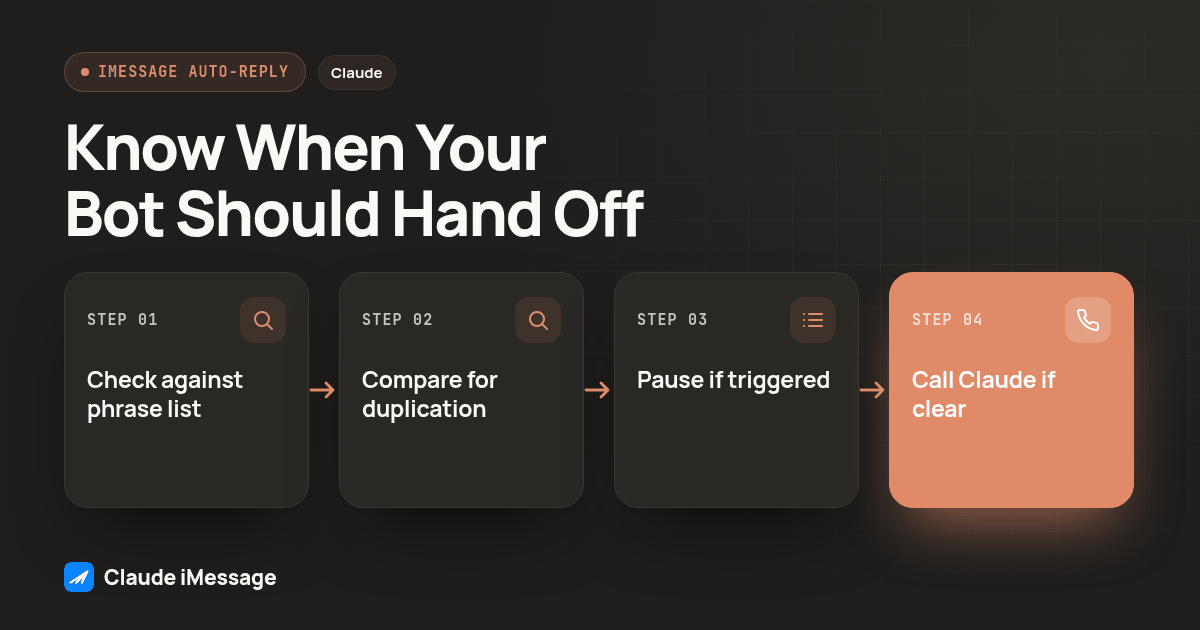
We group handoff triggers into four categories, and we check all four before letting the loop reach Claude at all.
- An explicit request for a person. Phrases like "talk to someone," "real person," or "is anyone actually there." Don't try to be clever about synonyms here; a short, specific phrase list catches almost all of these and almost never catches a false positive.
- A topic outside the bot's scope. Legal questions, refund decisions, medical details, anything your system prompt already tells Claude not to answer. If the prompt says don't discuss it, the handoff check should catch it before the message even reaches that prompt.
- A repeated question. If the same contact sends a similar message twice in a short window, the first reply likely missed the point, and a second automated attempt rarely fixes it.
- An opt out. Beam already fires a
contact.opted_outevent for this, and it should short circuit every other rule, including the three above.
Here's a starting checklist you can copy into your own rule config today:
HUMAN_HANDOFF_PHRASES = [
  "talk to a person", "speak to someone", "is anyone there",
  "real person", "lawyer", "legal", "refund",
  "cancel my account", "this is urgent",
]
Treat that list as a floor, not a finished product. The exact phrases that should trigger a handoff depend on what your bot is scoped to do, and a bot answering appointment questions needs a shorter list than one also handling billing.
How Do You Build The Handoff Rule Set, Step By Step?
Continuing from the loop above, the handoff check sits in two places: once before the Claude call, once after it.
- When
message.receivedfires, pull the contact's text and their last few messages from your own stored history, not from Beam, so a restart doesn't lose the repeat-question count. - Run the text against your handoff phrase list first, before anything else touches it.
- If no phrase matches, compare the new message against the contact's last message for near-duplication; increment a repeat counter if they're close.
- If the phrase check or the repeat counter trips, call Beam's
conversation_pausefor that conversation and stop. Do not call Claude at all. - Flag the paused conversation somewhere a human actually looks, an internal channel, a dashboard, a tagged contact field, since a pause with nobody watching it is the same as no handoff at all.
- If neither check trips, call Claude with the system prompt and the contact's text, same as the basic loop.
- After Claude responds, run a second, lighter check: does the reply itself contain a refusal or an "I'm not sure," a signal the model hit the edge of what it should answer even though the trigger list missed it.
- If that second check trips, pause instead of sending, rather than shipping an uncertain reply and hoping it lands fine.
A minimal version of the two checks around step two and step seven looks like this:
const HUMAN_HANDOFF_PHRASES = [
  "talk to a person", "speak to someone", "real person", "is anyone there",
  "lawyer", "legal", "refund", "cancel my account", "this is urgent",
];

function shouldHandOff(text: string, repeatCount: number): boolean {
  const lower = text.toLowerCase();
  if (HUMAN_HANDOFF_PHRASES.some((phrase) => lower.includes(phrase))) return true;
  if (repeatCount >= 2) return true;
  return false;
}

function replyLooksUnsure(reply: string): boolean {
  const lower = reply.toLowerCase();
  return lower.includes("i'm not sure") || lower.includes("i don't know") || lower.includes("i can't help with that");
}
Neither function needs a sentiment model or an external service to start. A plain keyword list and a repeat counter catch most of the situations that matter, and you can add a sentiment check later once you know what your own threads actually look like.
Which Situations Should Pull A Human Into The Thread?
Mapping triggers to actions makes the rule set easier to review with a teammate before it goes live.
| Trigger type | Example signal | What happens next |
|---|---|---|
| Explicit human request | "can I talk to a real person" | Pause immediately, no Claude call |
| Out of scope topic | A refund or legal question | Pause immediately, no Claude call |
| Repeated question | Same question twice in one session | Pause after the second match |
| Opt out | Contact texts STOP | Pause and halt all future automated sends |
| Uncertain Claude reply | Reply contains "I'm not sure" | Pause instead of sending that reply |
If you're running a second Claude agent on the same number instead of a human picking up the thread, that's a related but different setup, covered in our guide to running two Claude agents on one iMessage number. The handoff logic here assumes a person takes over; a second-agent handoff needs its own rules about which agent owns the conversation.
What Should You Test Before Pointing This At Real Customers?
A webhook that returns a 200 and a send that comes back queued both look finished. Neither proves the handoff logic actually works. Before a real contact texts in, run through this:
- Send a message containing one of your handoff phrases and confirm
conversation_pausefires and Claude's API is never called for that message. - Send the same question twice in a row from a test contact and confirm the second message pauses instead of generating a second automated reply.
- Text STOP from the test contact and confirm no further message goes out, automated or otherwise.
- Send a message designed to make Claude answer uncertainly and confirm your reply check catches it before the send step.
- Restart your server mid conversation and confirm the repeat counter and pause state survive, since a restart that forgets a pause will happily let Claude answer again.
- Confirm the human notification actually arrives somewhere a person checks, not just that the pause flag gets set in a database nobody looks at.
Our guide to testing a Claude texting agent before live contacts goes deeper on the general pre-launch checklist; treat the six steps above as the handoff-specific additions to run alongside it.
Before you connect
What do teams ask before they connect?
How long does it take to set up a handoff-aware auto-reply bot?
A developer who already has an Anthropic API key and a Beam workspace can get the webhook, the model call and a first version of the handoff rules running in an afternoon. Trusting it with a real phone number takes longer, because you still need to run the test procedure above against a contact you control and watch it handle a repeated question and an opt out correctly.
Do I need Beam's MCP server to build this, or is the webhook and REST approach enough?
The REST approach is enough on its own. MCP exists for an interactive AI client that decides mid conversation whether to call a tool, which fits Claude Desktop or Claude Code, not a backend that answers many customers without anyone watching. Your own server calling the webhook and REST endpoints keeps the handoff check in your code instead of inside Claude's own tool choices.
Does adding a human handoff change what Beam plan I need?
No. Live sending on Beam requires a plan and an assigned dedicated line regardless of whether your bot ever hands a thread to a person. The handoff logic itself runs in your own code and only calls Beam's existing pause and send tools, so it does not require a different plan tier on its own.
Does automatic handoff help with STOP requests and texting compliance?
Handoff and opt out are related but not the same thing, and opt out has to win every time. A contact texting STOP should stop receiving messages immediately, whether or not your handoff keyword list would have caught the word. Build the opt out check as its own hard rule ahead of the softer handoff rules, not as one more keyword in the same list.
I already built the basic auto-reply loop. Do I have to rebuild it to add handoff logic?
No. The handoff rule set is a check you add between the inbound webhook and the Claude call, and another one after Claude drafts a reply, not a replacement for the loop itself. If your webhook receiver, signature check and outbound send already work, you are adding one function and a pause call, not starting over.
Keep exploring