ai assistant by text message for family
By Beam team · Updated
Can an AI Keep a Family List in a Group Text?
Not inside a native group text, since that multi-person behavior is not documented for a Claude-based setup. What works today is close enough for most households: one shared line, built on Claude through Beam, that the whole family saves as the same contact, so one running list and its reminders stay current no matter which person last texted it.
Beam is an independent messaging platform, not an Anthropic or Apple product.
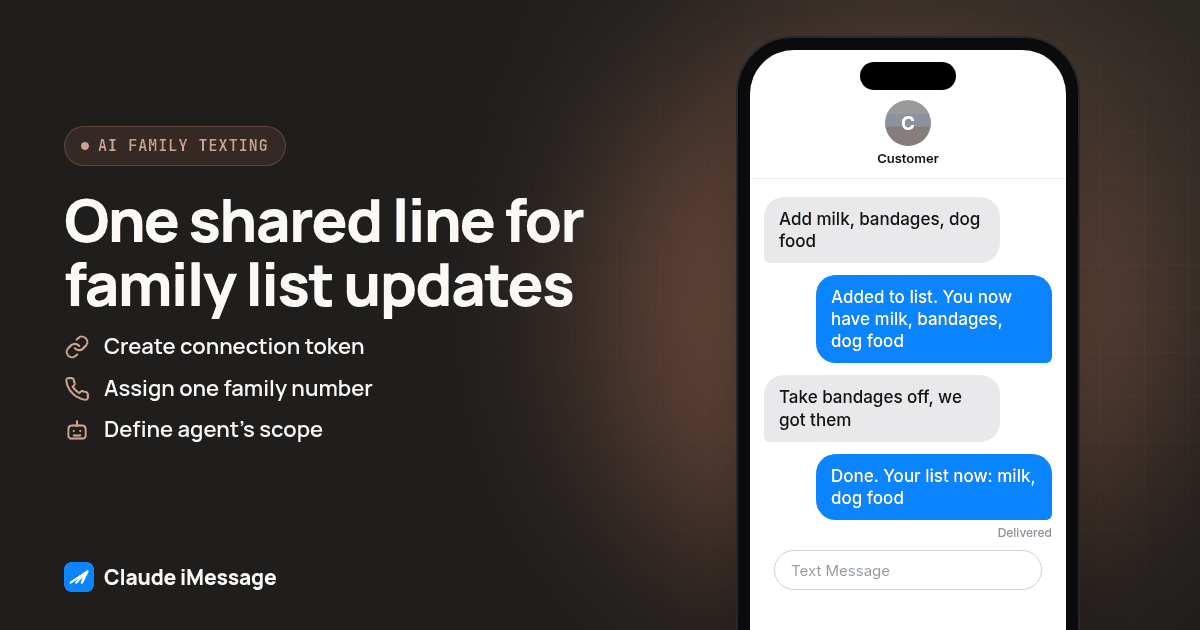
Why do families want one shared iMessage thread instead of another app?
We hear this one on calls more often than you'd expect, usually from a parent who has given up on another app before we even finish describing it. One recent caller put it exactly this way: "My kids blow up my phone all day. I want one thread where AI keeps the family list." That is the real question underneath "ai assistant by text message for family," and the honest answer has two parts: what a true group iMessage thread does on its own, and what a Claude-based line through Beam actually does instead.
Nobody asking this question wants a dashboard. They want the grocery list, the pickup schedule and the "who's bringing what to practice" question to live somewhere every phone already opens, without training a twelve-year-old or a grandparent on a new login. A native group text on iPhone already does part of that job: everyone a participant adds to the thread can see and reply to every message in it, which is the whole reason families use group texts for logistics in the first place. Apple documents how that works in its own guide to group conversations in Messages.
What a plain group text does not do is keep a list. Someone still has to scroll up through forty messages to remember whether anyone bought dog food, or keep a separate note that drifts out of sync with what actually got said in the thread. That gap, a group chat with no memory of its own, is exactly where an AI assistant gets asked to step in. The question is whether that assistant can sit inside the existing group thread itself, or whether it needs its own setup.
Can Claude actually join an existing family group iMessage thread?
Not as something we can claim today. Claude iMessage is Beam's name for connecting a Claude-based agent to a real line through Beam's workspace, using MCP so the agent can read a conversation and send a reply with permission, and nothing in that setup describes the agent joining a multi-person thread the way a person would. Beam is independent of both Apple and Anthropic, and that distinction matters here specifically: neither company operates this integration, and a native multi-person Apple group thread is Apple's feature, not something Beam documents the agent entering.
So if the literal request is "add Claude to our existing family group text the way you'd add a cousin," that is not a feature we can promise. What we can build, and what actually solves the problem callers describe, is a single assigned line the agent answers on, one that every family member saves as the same contact. It is not the same mechanism as a native group thread. It gets close enough to the result most families actually want.
How does one shared line work like a family group thread, in practice?
Here is the part worth being precise about, because the distinction changes what people should expect to see on their own screen.
| Native Apple group text | One shared Claude iMessage line | |
|---|---|---|
| Who sees each message | Everyone in the group, every time | Only the sender and the agent; other family members see the agent's answer, not each other's texts |
| Where the running list lives | Nowhere on its own; someone scrolls back or keeps a separate note | With the Claude-based agent, carried forward no matter who asks |
| How someone joins | A participant adds the new phone number to the group | Everyone just saves the same one contact; nobody is added to anything |
| What Claude can do inside it | Not documented for this setup | Read the conversation and reply, with permission, on the one assigned line |
The practical difference shows up the moment two kids text the same number from two different rooms. Neither one sees what the other typed, the way they would in a real group thread. What they both get is an answer built from the same list, because the list lives with the agent and the line, not with any single phone. For a family's actual use case, add this, what's on it, remind us about that, the list staying in sync matters more than everyone watching everyone else's texts scroll by. A parent who has already lived through a laptop-dependent AI setup falling over mid-week knows that feeling well; we cover that exact frustration, and the fix, in Claude by text, no laptop needed.
Screenshot: Two phone mockups side by side, each showing a different family member's Messages app with the same saved contact name, "Family List." Both threads show different questions asked at different times, but both show the agent's reply referencing the same three items on the list, to make the shared-state-not-shared-thread point visible at a glance.
What do we set up once so the whole family can just text one number?
This part is real setup work, and it belongs to whichever parent, older sibling or relative is comfortable doing it. It only has to happen once.
- Open a Beam workspace and go to Settings, then Developer access, to create a connection token scoped for read, train and send. Treat that token like a password; it does not belong in a text message to anyone, including the rest of the family.
- Connect the Claude side to that token, the same MCP setup used for any Beam line. Our setup walkthrough for a non-technical household covers this exact step for someone doing it for the first time.
- Assign one line, a single number the whole family will use, from Beam's supported number types: direct lines, real cell phone numbers, SIP endpoints, toll free numbers, regular local numbers or short codes. A household rarely needs more than one direct line for this.
- Decide, in plain language, what the agent is allowed to do on this line: add items to the list, mark them done, send reminders, answer plain questions about what's on it. Write that scope down somewhere, even just a note on your own phone, so everyone setting expectations agrees on it.
- Pause Beam's own built-in assistant on that line, if the workspace already runs one, so only the Claude-based agent answers for the family thread. Running two automated repliers on one number is how a family ends up with two different answers to the same question.
- Save the number as a contact on every family member's phone under one simple name, "Family List" works fine, before anyone sends the first real message. This is the step that actually delivers the "one thread" feeling: once the contact exists on every phone, texting the list looks exactly like texting anyone else already saved there.
What should the family actually send, and what does the list look like?
Nobody has to learn a command format. The agent reads plain text, the same way it would in any other Claude iMessage setup. Here is a copy-paste starter list to hand to the family once the number is live:
- "Add milk, bandages and dog food to the list"
- "What's on the list right now?"
- "Take diapers off, we got them"
- "Remind us about picking up from practice Thursday"
- "Who added the dentist thing?"
Keep that exact wording, or close to it, taped to the fridge or pinned in a family group text that still exists for actual back-and-forth conversation, separate from the one-line list number. That second part matters: this setup is not meant to replace the family's real group chat, where people actually talk to each other. It is meant to replace the list nobody keeps straight inside that chat.
How do we test it before the whole family starts relying on one number?
Run this short pass before anyone outside the test group gets the number, so the first real use isn't also the first bug report.
- Have one person add two items to the list and then ask what's on it, to confirm the agent reads back the same list it just added to, not a stale version.
- Have a second family member, from their own phone, ask for the list the first person just built. If the answer matches, the list is actually shared and not tied to whoever happened to text first.
- Ask the agent something outside the scope you wrote down in step four of setup, like booking an appointment or paying a bill, to see whether it says plainly that it can't do that instead of guessing at an answer.
- Text "stop" from a test contact and confirm no further messages reach that number, before a real family member does it by accident and you have to figure out why the "family" number went quiet for one kid.
If any of those four goes differently than expected, fix the agent's instructions and rerun the pass before the actual household starts using the number day to day.
What happens when the list needs a human, not an AI?
Some requests do not belong to the agent, and the setup should say so instead of guessing. If someone asks the agent to call a sibling, make a doctor's appointment or handle anything with real consequences, the right behavior is an honest "I can't do that, you'll need to handle it yourself or ask a person," not an improvised answer that sounds confident and isn't. The same pattern Beam's own built-in assistant already follows for business lines applies here: certain requests, a request for a human, a request outside the agreed scope, should pause the automated reply so the question doesn't just get answered badly. Writing down the scope in step four of setup is what makes that pause possible, since the agent can only decline cleanly what someone already told it not to attempt.
Does this work the same if some family members have Android phones?
Mostly, and the difference happens without anyone noticing. Beam sends from Apple and Android devices, so the shared line replies as iMessage to eligible iPhones on a line that supports it, RCS to Android phones and carriers that support it, and SMS as the fallback either way. Nobody in a mixed-phone household has to do anything differently depending on which phone they carry. The agent's answer about what's on the list looks the same from either side, even though the channel underneath is different for each person texting in.
Is one shared line the right fix for every family?
Probably not for a household that mostly wants to talk to each other, not to an assistant. A plain group text still wins there, the same way it always has, because the whole point is that everyone sees everyone else's messages. This setup earns its place specifically for the recurring, trackable stuff, shopping lists, pickup reminders, "did anyone already handle this," where a list that forgets nothing beats a thread everyone has to scroll through. If a household's real problem is coordinating people, not tracking items, a native group text alone may already be enough, and adding an assistant on top of it would be solving a problem nobody actually has.
For anyone deciding whether a text-based assistant is worth the setup at all versus a dedicated app with its own screen, our side-by-side comparison of the two approaches walks through that decision in more depth than fits here, including when a richer interface actually earns its place over plain text.
Before you connect
What do teams ask before they connect?
How long does it take to set up one shared line for the whole family?
The setup itself is quick for whoever is doing it, usually well under an hour once the line is assigned and the connection token is in place. Most of the real time goes into testing the handoff rules and saving the number as a contact on every family member's phone before the first real message goes out.
Can every family member see the same list, even though they're each texting from their own phone?
Yes, because the list lives with the Claude-based agent and the shared line, not on anyone's individual phone. Each person's Messages app still shows its own thread with that one contact, the same way any two people texting the same business number each see their own conversation, but whatever anyone adds, finishes or asks about updates the one list the agent is tracking for the whole family.
What happens if a family member texts STOP or wants to stop using it?
The opt-out takes effect immediately and permanently for that one contact, the same rule that applies to any Beam-connected line. No further messages go out to that family member from that number, so if one person opts out, the rest of the family can keep using the shared list without them until someone resubscribes them another way.
Does this work if some of the family has Android phones?
Yes. Beam sends from Apple and Android devices, so the line replies over iMessage to eligible iPhones, RCS to Android phones and carriers that support it, and SMS otherwise. Nobody in the family has to match anyone else's phone for the shared list to keep working, since the channel decision happens automatically on Beam's side.
Can we turn this off later without losing the list or the number?
Revoking the connection token stops the Claude-based agent from reading or sending anything new, but the phone number and the message history stay exactly where they were. If the family wants to go back to a human-run line, or just pause the experiment, nothing about the number or the past conversation disappears when the agent is turned off.
Keep exploring