claude sms
By Beam team · Updated
Text Claude From an Android Phone When There's No iMessage
Claude's own Android app can draft a text and hand it to your messaging app, but it does not read incoming messages or run as something other people can text, and independent testing shows the send action itself often fails. The actual way an Android user without iMessage texts Claude is a real phone number connected to Claude through Beam, which sends iMessage when the recipient is eligible and automatically falls back to RCS, then SMS, so the Android side of the conversation never breaks.
Beam is an independent messaging platform, not an Anthropic or Apple product.
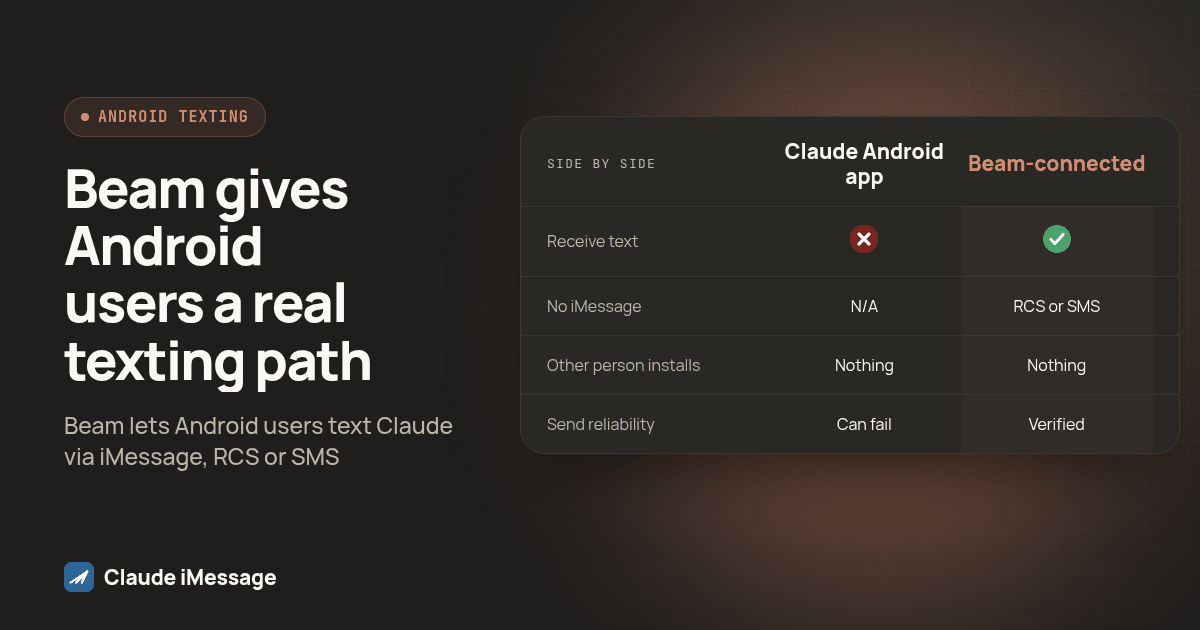
Why Doesn't Claude's Own Android App Just Send the Text?
Someone hears that Claude "can send texts," tries it from an Android phone with no iMessage in sight, and gets a drafted message sitting in an app instead of an answer waiting in a thread. That gap is real, and it comes from a documented limit in how the Android app is built, not a broken phone. We set up and test the actual working path below: a maintained number that sends iMessage, RCS or SMS depending on what the other phone supports, so the channel never becomes the reader's problem.
Anthropic's support article on using Claude with Android apps lists "draft and send messages through your default messaging app or third-party apps" as one of the available actions (support.claude.com: use Claude with Android apps). Read past the headline verb, though, and the same article narrows it considerably: "Claude does not read existing messages or emails, only creates new content," and it has no direct access to your contacts. In practice, the action opens your messaging app with a draft loaded in, and you still have to pick the recipient and tap send. That is one step short of an actual send, and the step matters more than it sounds.
Independent testing backs up how often even that smaller promise breaks down. MakeUseOf tried the feature directly and reported that Claude "can send text messages along with WhatsApp and Slack messages" according to the product description, but when asked to do it, the assistant told the tester it could not send WhatsApp or text messages and opened a web link instead (MakeUseOf: Claude vs Gemini Android apps). The feature is scoped to drafting, and the drafting step itself does not always complete.
None of this is a knock on the phone or the carrier. It is a scope limit in one specific app action, and it explains why someone can read that Claude "sends texts" and still end up with nothing in their thread.
So What Does "Texting Claude" Actually Mean When It Works?
When people describe texting Claude the way they would text a friend, send a message, wait, get a reply in the same thread, they are not describing the Android app action above. They are describing a different setup entirely: a real phone number, connected to a Claude client through an API, that reads an incoming conversation and sends a reply back through that same number.
Beam is built for exactly that connection. A developer or agency owner links a compatible Claude client, such as Claude Code or a desktop client that supports a local stdio bridge, to a Beam workspace through Developer access, using a bearer-authenticated connection (Beam: Claude iMessage). Once that connection has sending permission and the workspace has an active assigned line, Claude can read the thread and send a reply through it. The person on the other end never installs anything or opens Claude at all. They text a saved number the same way they text anyone else, which is the entire point for a reader who just wants an answer, not a new workflow.
That distinction is also why two people can have completely different experiences with the same sentence, "I texted Claude." One is describing a feature that stops short of sending. The other is describing a two-way conversation running through a maintained line.
What Happens to the Message if My Phone Doesn't Have iMessage?
This is where the Android angle actually resolves. A Beam-connected number is not locked to one channel, and it does not require the recipient to have an iPhone, RCS, or anything specific installed. It picks the most capable available channel in order: iMessage when the recipient is an eligible iPhone and the line supports it, RCS when the Android recipient's phone and carrier both support RCS, and plain SMS everywhere else. Beam sends from both Apple and Android devices on the sending side, so the fallback is not a one-way accommodation.
From the Android reader's side, this means they never choose a channel or need to know which one carried the message. They save the number, send a text, and the reply shows up in their normal messaging app. If their carrier does not support RCS, the message still arrives, just as SMS instead, and the thread looks the same either way.
It is worth separating this from the registration question some readers will ask next. iMessage and RCS avoid the carrier A2P 10DLC registration process entirely. SMS fallback, the exact path that covers an Android phone without RCS, remains subject to the applicable carrier A2P requirements, and ordinary consent and opt out rules apply no matter which of the three channels ends up carrying a given message.
Diagram: a simple flow showing one outgoing Beam message with a single decision point labeled "Is the recipient an eligible iPhone?" branching to iMessage, then a second decision labeled "Does the Android phone and carrier support RCS?" branching to RCS or SMS, with all three paths ending in the same single conversation thread icon.
How Does Claude's Android App Action Compare to a Connected Beam Number?
| Claude's Android app action | A Beam-connected number | |
|---|---|---|
| Who starts the conversation | You, from your own phone | Anyone who has the number, including an Android user with no iMessage |
| Can it receive and answer an inbound text | No. It drafts outbound content for you to send | Yes, once the connected client has read and send permission on an active line |
| What happens with no iMessage on the recipient's end | Not applicable, since it only drafts your own outgoing message | RCS if supported, SMS if not; the recipient sees a normal text either way |
| What the other person has to install | Nothing, but they also are not the one using this feature | Nothing. They text a saved number in their existing app |
| Reliability of the send step itself | Draft and review required; independent testing found the send action can fail and fall back to a web link | Message is queued through Beam's own infrastructure once the connection and permissions are verified |
"Drafting a message for you" and "answering a message from someone else" are different jobs, and only one of them is what an Android user without iMessage is actually asking for.
How Do You Actually Set This Up?
Use this order. Each step depends on the one before it, so do not skip ahead to testing before the permissions are in place.
- In Beam, open Settings, then Developer access, then MCP and API. Name the connection and choose its permissions deliberately. Read and train come selected by default; sending and automation each require an explicit grant, and the token itself cannot be shown again once you leave the screen, so copy it immediately.
- Decide which Claude client will hold this connection. For Claude Code, register the server with a bearer-authenticated HTTP command once BEAM_TOKEN is set in your terminal environment. For a desktop client that supports a local stdio process, download Beam's bridge script and run it with Node.js 20 or newer, pointing at your token in the client's configuration. Hosted connectors requiring an OAuth-only sign-in are not supported here, so confirm which kind of client you have before you start.
- Confirm the connection reaches the right workspace by asking the client to call the workspace read tool and report back the workspace name. Match that against the workspace you intended before granting anything further.
- Check that the workspace has an active assigned line. A connection token is scoped to a workspace; it does not by itself assign or activate a sending number.
- Send a real test message from a second phone, not the one you are sitting at, and confirm it lands in the thread and gets a reply. If that second phone is Android, send it from a device you know does not have RCS turned on at least once, so you are testing the SMS fallback path specifically rather than assuming it works because RCS worked.
- Check the message status rather than trusting a success message inside Claude. Accepted or queued is not delivered, and delivered is not read. Confirm the actual status before deciding the setup is done.
What Should You Test Before You Trust This on Android Specifically?
Most setup guides stop at "send a test message." Android's channel mix means that single test can pass without proving the one thing you need to know: whether the fallback works when RCS is not available.
Here is a short checklist worth running before handing a number to anyone else:
Before calling an Android setup reliable:
- Sent a test message to an Android phone with RCS enabled and confirmed the channel
- Sent a second test to an Android phone or carrier combination without RCS, to confirm the SMS fallback actually fires
- Confirmed the reply from Claude lands in the same thread on both tests, not a separate one
- Checked the message status for both tests instead of trusting a success message inside the client
- Written down which carrier or device combination you tested, since RCS support varies by both
RCS support depends on the phone and the carrier together, not the Android version alone, so a clean test on your own device does not tell you how the setup behaves for someone on a different carrier. Running both branches once is a small amount of extra time against a conversation that quietly fails for some readers and not others.
Beam is an independent messaging platform that connects to Claude through this kind of workspace integration. It is not an Anthropic or Apple product, and nothing here changes how Claude works inside its own apps.
Some readers have reached for other third-party connectors instead, including at least one SMS-focused MCP integration built around a separate texting service (Mobile Text Alerts: Claude and SMS). That is more evidence the underlying gap is real. The difference worth noting is channel coverage: a setup scoped to SMS alone still has to decide what happens when the recipient could have received a richer iMessage or RCS conversation instead, which is the problem channel fallback through one connected number avoids.
If your real blocker is a laptop that has to stay open, not the channel question, our guide on reaching Claude by text without keeping a laptop open covers moving the connected client to maintained infrastructure. For texting an AI assistant through Messages versus opening a dedicated app, see our comparison of a text-based assistant and an app. For the connection steps themselves, our step by step Claude Code setup covers the bearer token and stdio bridge paths in more detail than the summary above.
Before you connect
What do teams ask before they connect?
Does Claude's own Android app actually send a text message today?
Not on its own. Anthropic's support article lists drafting and sending messages through your default messaging app as an available action, but the same article says Claude does not read existing messages and does not have direct access to your contacts, so you still review and tap send yourself. Independent testing found the action sometimes fails outright and opens a web link instead of a message draft, so treat it as a drafting helper, not a way for someone else to text Claude and get a reply.
What happens if the person I am texting does not have an iPhone or iMessage?
A connected business number is not limited to one channel. It sends iMessage to an eligible iPhone, RCS to an Android phone whose device and carrier both support RCS, and plain SMS when neither applies. The reader never has to pick a channel or know which one was used. They text the number they saved and read the reply in the same thread.
How long does it take to get a number Claude can actually receive texts on?
Creating a connection token in Beam and pointing a compatible Claude client at it takes a few minutes. What takes longer is confirming the workspace has an active assigned line, granting the right permissions, and testing a real message from a phone that is not yours, especially on Android where you want to confirm RCS or SMS fallback separately. Budget an afternoon for the full setup and test pass, not just the token step.
Do I need A2P 10DLC registration to make this work on Android?
It depends on which channel carries the message. iMessage and RCS avoid the carrier A2P 10DLC registration process. SMS fallback, the path that covers an Android phone without RCS support, remains subject to the applicable carrier A2P requirements. Consent and opt out rules still apply no matter which channel sends the message.
Can I keep using Claude's Android app to draft texts once I have a connected number set up?
Yes, those are two different workflows and neither one replaces the other. Claude's in-app drafting action is still useful when you are writing a message to send from your own phone. A connected business number solves a separate problem: letting someone else text that number and get an answer back from Claude in the same thread, which the in-app action was never built to do.
Keep exploring
Which guides go deeper?
Where do these facts come from?
Checked October 2026.