imessage cli
By Beam team · Updated
iMessage From the Terminal: CLI Scripting vs a Hosted API
You can send an iMessage from a terminal with a single osascript command, and it genuinely works while you are logged in and watching it run. It stops working unattended because driving Messages this way needs an active GUI session and a one time permission click, both of which disappear on a cron job, a headless Mac, or an SSH session. A CLI wrapped around a hosted API skips that dependency entirely: one HTTPS call, no Mac required.
Beam is an independent messaging platform, not an Anthropic or Apple product.
Can You Really Send an iMessage From a Terminal Command?
We get asked some version of this question almost every week from someone wiring an agent to send real texts: can you just call Messages from a terminal, the way you'd call any other tool? The honest answer is yes, right up until the script has to run without you there to babysit it.
You can, and the shortest version of it fits on one line. David Walsh's command line iMessage tip shows the whole trick: osascript -e 'tell application "Messages" to send "DWB and MooTools FTW!" to buddy "David Walsh"' (davidwalsh.name). That one line opens Messages, finds the named buddy, and sends. Run it from Terminal on a Mac that is signed into Messages, and a real blue bubble lands.
Wrap that same idea in a small script, swap the hardcoded name for arguments, and you have a working CLI. It is a fair starting point for testing an idea, and we do not want to talk anyone out of trying it first. The part that catches builders off guard is what happens next, when that same script gets copied into a cron entry or a launchd job and left to run on its own.
Why Does an Unattended AppleScript Stop Working?
Because AppleScript talking to Messages is not really "running a command." It is sending an Apple Event to a GUI application, and Apple Events aimed at apps like Messages carry two requirements that a one off terminal test quietly satisfies without you noticing: an active login session with the screen not locked, and an Automation permission that macOS grants per app, per script, through a dialog box a human has to click the first time it appears.
A cron job fires from a background launch context that may lack a real login session. A launchd agent set to run at boot can start before anyone logs in. An SSH session from another machine has no local GUI session at all, no matter how valid your credentials are. In any of those cases, the exact same tell application "Messages" to send that worked a moment ago at your own keyboard can fail silently, hang on a permission prompt nobody will ever see, or throw a vague automation error, depending on which piece is missing.
This is not a one off report. Our own guide on the Clawdbot, Moltbot and OpenClaw setup history, the same self hosted agent project at three points in its name, found the identical failure shape in its official iMessage channel: it still "breaks on a headless Mac unless someone logs in once before handing the Gateway to a LaunchAgent." Same cause, different project name, and the GUI session requirement does not go away just because the tool changed.
What Does the Permission and Thread Problem Actually Look Like in Practice?
Two separate failure modes show up in the wild, and it helps to know which one you are looking at before you start debugging the wrong layer.
The first is the permission and session problem above, which tends to show as a script that works perfectly in a terminal window and then does nothing, or errors, once moved to any unattended trigger. The second is narrower but just as common: Messages needs an existing conversation thread with the recipient before a scripted send will succeed. A real example from the osa-imessage project's issue tracker shows exactly this: a developer's script threw Error: no thread with handle '+<mycellnumber>' (-2700) when sending to a number, and the fix was including the full country code rather than a local format the thread lookup did not recognize (GitHub, wtfaremyinitials/osa-imessage#20). A follow up note on that thread adds the detail that matters most here: the send only goes through when an active iMessage conversation with that contact already exists on the sending Mac, a different requirement than "give it a phone number and it works."
Neither of these is a bug you can patch your way around for good. They are structural consequences of automating a consumer chat app that was never built with an unattended sender in mind.
CLI Scripting vs a Hosted API CLI: What Is the Real Difference?
Put side by side, the two approaches are not really competing on features. They are competing on what has to stay true, and stay babysat, for either one to keep working.
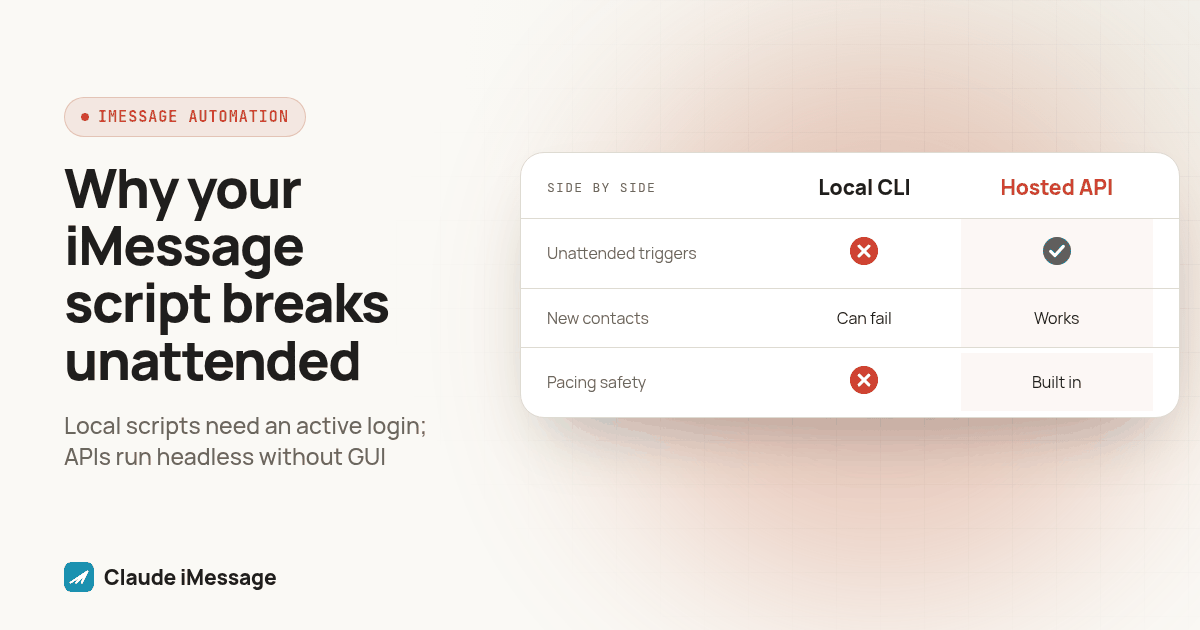
| Local CLI (osascript / AppleScript) | CLI against a hosted API | |
|---|---|---|
| What has to run it | A specific Mac, signed into Messages, with an active login session | Any machine with network access: Mac, Linux, a container, a CI runner |
| Survives unattended triggers | No, without a logged in GUI session and a granted Automation permission | Yes, it is a plain HTTPS call with no GUI dependency |
| New contact, no prior thread | Can fail outright, per real reports against osa-imessage |
No special requirement; the number is the input |
| Pacing and number safety | None built in; the script sends as fast as your loop allows | The provider paces sends to protect the number from being flagged |
| Delivery visibility | Fire and forget; no native status check | A lookup call returns the message's current status |
| Where the number lives | Your personal or business Apple ID | A dedicated number the provider issues and operates |
| What breaks it | A sleeping Mac, an expired permission, a macOS update, a logged out session | A different failure surface entirely, not the laptop on your desk |
That pacing and number safety row matters more than it looks. More than one agency owner on our calls has described a version of the same thing: Apple flagged a business iMessage line after it sent too many texts in a short window, and the fix was a new number, not a setting. A terminal loop calling osascript has no concept of pacing a send to protect the line it uses. A hosted API built to protect its own numbers bakes that pacing in instead of leaving it to whoever wrote the loop.
How Do You Build a Minimal CLI Wrapper Against a Hosted API?
If the local script route has already shown you its limits, here is the shape of a replacement that keeps the same "type a command, send a text" feel without any of the Mac dependency.
- Get a workspace API key from your hosted provider rather than an Apple ID. Beam's API authenticates every request with a single
x-api-keyheader, not a signed in session. - Store the key as an environment variable, never hardcoded in the script, the same rule that applies to any API credential.
- Write one function that sends, taking a phone number and a message as arguments, mirroring the one liner osascript command but pointed at an HTTPS endpoint instead of the Messages app.
- Generate a per send idempotency value before the call, so a retry on your side never sends the same text twice. Our send_text tool guide covers why: a plain text send endpoint has no dedup key of its own, so the caller owns that logic.
- Call the send endpoint with the recipient, the message body, and any optional fields like attachments the API documents, then capture the returned message ID.
- Add a status check command that takes that ID and reports the current state, something a bare osascript send can never give you, since Messages hands your script no receipt.
- Wire the function into cron, launchd, or a CI job the way you would have wired the osascript version, and notice the unattended trigger needs no special handling, because there was never a GUI session for it to be missing.
Here is a copy paste starting point for step three through five, written as a plain shell function you can drop into a script today:
send_imessage() {
  local to="${1}"
  local message="${2}"
  local idem="$(uuidgen)"

  curl -sS -X POST "https://beam.aisync.link/v1/messages" \
    -H "x-api-key: ${BEAM_API_KEY}" \
    -H "Content-Type: application/json" \
    -H "Idempotency-Key: ${idem}" \
    -d "$(printf '{"to": "%s", "message": "%s"}' "$to" "$message")"
}
Run send_imessage "the recipient's number" "Running the weekly check now" from a terminal, from a cron entry, or from a Linux box with no Messages app on it, and the call behaves the same way every time, because nothing about it depends on a logged in session at the other end.
Diagram: a split screen showing two command line windows side by side. The left window runs the osascript one liner against a Mac icon with a lock symbol over it labeled "requires active login." The right window runs the curl based send_imessage function against a generic server icon with no lock, labeled "runs headless."
What Is the Procedure to Test an Unattended Script Before It Touches Real Contacts?
Whichever path you build, run it through this before any real contact sees a message from it.
- Send one test message by hand, from a terminal you are watching, to a number you control, and confirm it arrives.
- Log out of the Mac, or close the SSH session that approved the Automation permission, and fire the same script again untouched.
- If step two is an osascript script, expect it to fail, hang, or do nothing, since that is the exact gap this guide describes; note the failure mode so you recognize it later.
- If step two is a CLI wrapper against a hosted API, confirm it still sends cleanly with no session active, the entire point of removing the GUI dependency.
- Send to a brand new number that has never texted the sending line before, and compare how each approach handles a contact with no existing thread.
- Send three test messages back to back and check whether anything paced the delivery, or all three left at once with no spacing.
- Pull the message status for your most recent test send, and note whether your tooling can answer "did this deliver" without you opening Messages.
- Only move to real contacts once a script has passed steps one through four with no human standing by to catch a failure.
Which Setup Should You Actually Run?
If the script only ever fires while you are at the keyboard, a one line osascript command is a reasonable place to stop. The moment the trigger is a schedule, a server, or an agent working overnight, the GUI session requirement becomes the whole story, and no clever AppleScript removes it, since the requirement sits in how Apple Events reach a GUI app, not in how the script is written.
Beam is an independent messaging platform, not a feature of Anthropic's Claude or of Apple's Messages, and the hosted route above runs through Beam's own infrastructure rather than anyone's personal Apple ID. For the full picture of what self hosting an iMessage sender actually requires, our build your own iMessage API guide walks through the Mac, the dedicated Apple ID, and the maintenance load that comes with it. If your terminal script is really feeding a Claude agent, our Claude Code and iMessage MCP setup guide covers that connection without a custom CLI at all, and our Clawdbot, Moltbot, OpenClaw setup guide is worth a look if you landed here from any tutorial using one of those three names, since the same headless Mac problem shows up there under its own CLI tool. And if the agent needs to make outbound calls as well as send texts, RizzDial's MCP connection for Claude and ChatGPT covers the calling side of the same agent.
Before you connect
What do teams ask before they connect?
Does the local CLI approach, osascript or AppleScript against Messages, ever make sense for sending a real iMessage?
Yes, for a one off, interactive send from your own Mac while you are logged in and watching it run. It genuinely works for that case, and plenty of short tutorials show the exact one line command. Where it stops making sense is the moment nobody is sitting at that Mac to notice when it quietly stops firing.
Why does a script that worked when I ran it by hand stop firing once it is on a schedule, a server, or an SSH session?
Driving Messages with AppleScript means sending an Apple Event to a GUI app, and Apple Events of that kind need an active, logged in session with the screen not locked, plus an Automation permission that macOS only asks for once, through a dialog a human has to click. A cron job, a launchd agent, or an SSH session often has no such session behind it, so the same tell application command that worked at your keyboard either errors out, hangs, or silently does nothing once nobody is there to approve it.
How much setup time does switching from osascript to a hosted API CLI actually save?
Most of the time disappears because there is no Mac to dedicate, no Apple ID to sign into Messages, and no permission dialog to click through on a schedule. You request a workspace key, and you can issue your first curl call in the same sitting. The remaining setup time is whatever it takes your own script to read an API key from an environment variable, which is the same five minutes either way.
If I already built automation on top of osascript or a tool like osa-imessage, how hard is it to switch to a hosted API without starting over?
Easier than it sounds, because only the sending layer changes. Whatever your script already decides, what to say, to whom, and when, stays exactly as it is. You are swapping one function, the part that currently shells out to osascript or an AppleScript wrapper, for a plain HTTPS call, and dropping the workarounds that existed only because Messages required them, like needing an existing thread with the recipient before a send would succeed.
Can a CLI wrapper around a hosted API run somewhere other than a Mac, like a Linux server or a CI pipeline?
Yes. Once sending is a curl call against an HTTPS endpoint, the machine making that call does not need Messages installed, does not need to be a Mac at all, and does not need a logged in GUI session. A Linux box, a container, or a CI runner can issue the same request a Mac terminal would.
Keep exploring
Which guides go deeper?
Where do these facts come from?
Checked November 2026.