claude code notify when done
By Beam team · Updated
Make Claude Code Text You When a Task Finishes
Wire Claude Code's Stop and Notification hooks to a one-line curl call against Beam's REST API, and the moment a task finishes, errors, or stalls waiting on your permission, a real text lands on your phone, the same place every other urgent message already lands. It takes less setup than the ntfy or Telegram workaround most developers already copy-paste from a GitHub thread, and it skips the extra app entirely.
Beam is an independent messaging platform, not an Anthropic or Apple product.
What's Actually Missing When You Run Claude Code Without Watching It?
We run Claude Code on long jobs often enough that checking the terminal became its own task. A migration script chewing through a large table, a refactor Claude is still working through, a permission prompt sitting untouched because we stepped away from the desk: all three look identical from across the room, which is to say invisible. Beam is an independent messaging platform, not a feature built by Anthropic or Apple, so none of what follows is a hidden setting buried inside Claude Code itself. It is a few lines in a config file most developers already have open, pointed at a service that happens to own a phone line.
A thread on Anthropic's own plugins repository asks for exactly this capability: some way to know Claude finished without refreshing a terminal window every few minutes (GitHub issue #798). This is not a one-off complaint. Developers already run personal notification bots that ping a phone through Telegram or a push service just to avoid that exact kind of babysitting, which says the terminal's silence is the real defect here, not any particular task Claude happens to be running.
Three situations deserve a different reaction, and Claude Code already tells them apart if you listen for the right signal. A long job that finishes clean is good news you can act on whenever you get back to your desk. That same job hitting an API error partway through is bad news you want sooner rather than later. A permission prompt sitting there waiting for a yes or no is neither; it is a stalled clock, and the longer it sits unanswered, the more of the session you lose for nothing. Treating all three as one generic "Claude did something" alert is why most people give up on notifications after the first noisy afternoon.
Which Claude Code Hook Should Trigger the Text?
Claude Code ships a hook for each of those three moments. The Stop event fires once per turn when Claude finishes responding, which is the one to use for a clean completion. StopFailure fires in its place when the turn ends in an error instead, so you can point it at a different message or skip it entirely if you only care about successes. Notification fires any time Claude Code shows you something, filtered by a matcher value; agent_needs_input and permission_prompt are the two that actually mean a decision is pending, while agent_completed just duplicates what Stop already tells you (Claude Code hooks reference).
All three live in the same settings.json file, under a hooks object keyed by event name:
{
  "hooks": {
    "Stop": [
      { "hooks": [{ "type": "command", "command": "~/.claude/notify-beam.sh done" }] }
    ],
    "StopFailure": [
      { "hooks": [{ "type": "command", "command": "~/.claude/notify-beam.sh error" }] }
    ],
    "Notification": [
      {
        "matcher": "permission_prompt|agent_needs_input",
        "hooks": [{ "type": "command", "command": "~/.claude/notify-beam.sh decision" }]
      }
    ]
  }
}
Each entry just runs a command. Command hooks time out after ten minutes by default, which is far longer than a single curl call needs, so a slow network connection is not the thing that will trip you up here.
How Do You Turn a Hook Into an Actual Text Instead of a Desktop Popup?
Plenty of developers already use a one-line curl inside the hook command for this, aimed at a push service. One widely shared setup pipes the Stop hook into ntfy, a free alert relay, gated behind a sentinel file so it only fires during unattended runs (noahcoffey.com). A second guide extends the same idea across both the Stop and Notification hooks, and flags that the Notification hook's exit code is ignored entirely, so you have to test the command by hand rather than trust a clean hook registration (aq.dev). Both work. Neither one puts the alert where a text message already lands.
Beam's REST API takes the same curl pattern and points it at a phone number instead of a push topic. Create a workspace credential once, under Settings, then API key, and send it as an x-api-key header on a request to https://beam.aisync.link/v1/messages. That request body needs only a recipient and a message; Beam picks iMessage when the recipient's phone supports it and falls back to SMS otherwise, queues the send, and hands back an id you can check on later.
How Is a Beam Text Different From ntfy or a Telegram Bot For This?
| ntfy | Telegram bot | Beam text | |
|---|---|---|---|
| Extra app to install | Yes, the ntfy app | Yes, Telegram | No, it lands in the Messages app already on your phone |
| What you set up first | A topic name | A bot token and a chat id | A workspace API key |
| Where the alert shows up | A push notification from a separate app | A chat inside Telegram | The same thread you already text people in |
| Depends on that app's own notification settings | Yes | Yes | No, it behaves like any other text, because it is one |
None of this makes ntfy or a Telegram bot the wrong call. They are free, well documented, and already running on plenty of machines. Pointing the same hook at Beam instead makes a narrower case: the alert behaves like every other urgent message on your phone, not like one more app competing for a notification you might have muted months ago and forgotten about.
How Do You Wire This Together, Step By Step?
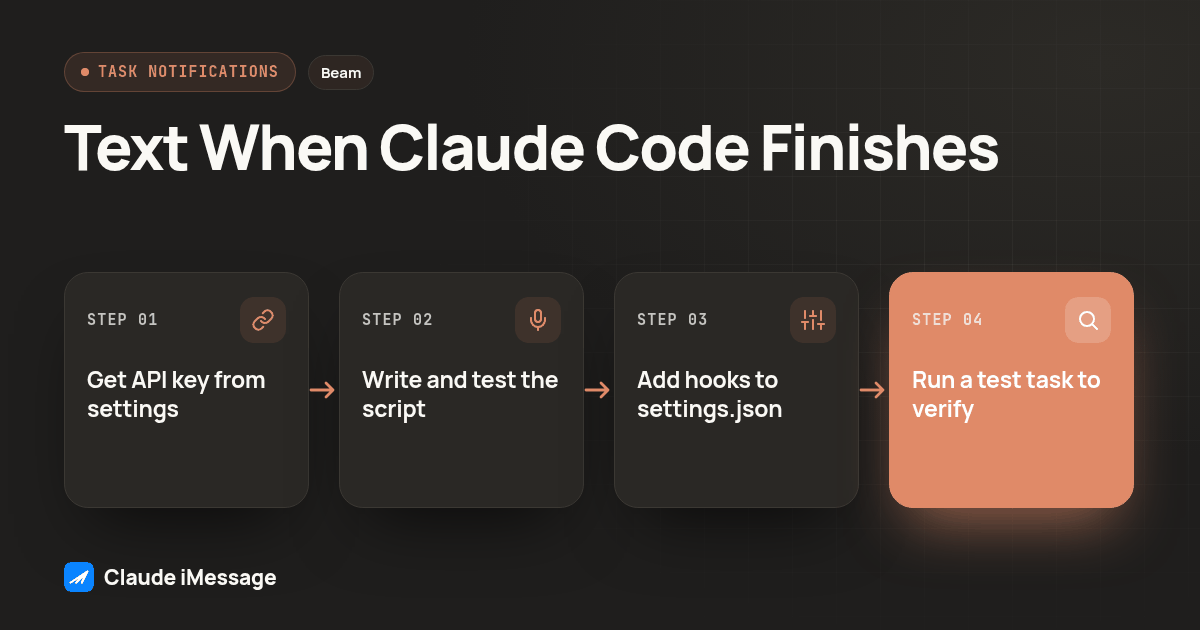
- In Beam, open Settings, then API key, and copy the workspace key. It will not be shown to you again, so paste it somewhere private before doing anything else.
- Save a short script, for example
~/.claude/notify-beam.sh, that reads a message from its first argument and curls it to Beam. - Make the script executable, then run it once by hand from a terminal, sending yourself a real text, before wiring it into Claude Code at all.
- Open
.claude/settings.jsonin the project, or~/.claude/settings.jsonfor every project, and add aStopentry pointing at the script with a "done" style argument. - Add a
StopFailureentry with a different argument, so a failed run reads differently from a clean one when the text arrives. - Add a
Notificationentry matched topermission_promptandagent_needs_inputonly, so you are not texted for every routine notification Claude Code sends. - Restart Claude Code, or open a fresh session, so it rereads the edited settings file.
- Run one real task, long enough to finish on its own, and confirm the text arrives before trusting the setup with anything unattended overnight.
That script stays short:
MESSAGE="${1:-Claude Code needs you}"
curl -s -X POST https://beam.aisync.link/v1/messages \
  -H "x-api-key: $BEAM_API_KEY" \
  -H "Content-Type: application/json" \
  -d "{\"to\": \"$MY_PHONE\", \"message\": \"$MESSAGE\"}"
Keep BEAM_API_KEY and MY_PHONE as environment variables set in your shell profile, never pasted directly into the script. That is the same reasoning Beam's own developer docs give for connection tokens generally: a credential sitting in plain text in a file you might commit by accident is a credential you will eventually have to revoke.
How Do You Know the Text Actually Landed?
A queued response from Beam's API is not a delivery receipt. It only confirms the request was accepted, the same way a hook actually running is not proof a phone buzzed. Check the message's recorded status before trusting either one, the same way you would check any other queued send rather than assuming success from a clean exit code.
In practice that means a second curl, a few minutes later, against the message id Beam handed back, or simply opening Beam's own inbox and confirming the text you sent yourself shows as delivered rather than stuck at queued. For a personal alert like this, checking once by hand the first time you set it up is enough. You do not need a polling loop watching a text to yourself.
What Should You Test Before You Trust This Overnight?
Before you let any Beam-wired hook run unattended:
- The script tested by hand from a terminal, with a real text landing on your phone
- Stop and StopFailure read differently, not the same message for a clean run and a crashed one
- Notification matched only to permission_prompt and agent_needs_input, not every notification Claude Code sends
- BEAM_API_KEY and your phone number stored as environment variables, never pasted into the script itself
- One full overnight run checked the next morning against what Beam's inbox actually shows
Skipping the last line is the most common shortcut, and the most expensive one. A hook that fires correctly on a short test task can still go quiet on a long one if the environment variables it needs are not present in whatever shell actually launches Claude Code overnight, as opposed to the interactive shell you tested it in by hand.
What Breaks This, and How Do You Fix It?
The most common failure is quiet. The Notification hook ignores whatever exit code your script returns, so a broken curl call, a missing environment variable, an expired key, none of it shows up as an error inside Claude Code itself. The fix is to run the exact command from your hook by hand in a plain terminal first, with the same environment variables set, and only wire it into settings.json once that bare command actually sends a text on its own.
The second common failure is a Stop entry that fires correctly but says nothing useful, because the script hardcodes one message regardless of which hook called it. Pass the hook name or a short label as the argument, the way the example script above does, so the text itself tells you whether the news is good or bad before you even open your laptop. A third, smaller trap: Claude Code's background tasks and subagents raise their own lifecycle events, so a hook written only for the main session's Stop event can stay silent on work a subagent finished on its own.
Do You Need A2P Registration or Carrier Approval to Text Yourself?
Not for this. Beam's iMessage and RCS channels do not require the carrier A2P 10DLC registration process that SMS numbers go through, and texting your own phone from your own workspace is about as low-risk a use case as sending gets. That changes the moment you point the same hook at a teammate instead of yourself: SMS fallback, used when someone's device or carrier does not support RCS, stays subject to the applicable carrier A2P rules, and consent and opt-out handling still apply to anyone besides you.
What About Codex or Other Agents, Not Just Claude Code?
Claude Code is not the only agent that leaves you watching a terminal. We have covered the same underlying pattern for Codex elsewhere, giving the agent itself a phone number so it can text you directly from inside a session, rather than through a settings file hook (Give Codex Its Own iMessage Number With MCP). The two approaches solve adjacent problems: a hook notifies you about the agent from the outside, while an MCP connection lets the agent decide for itself, mid-session, when a text is worth sending.
How Does This Compare to Just Using Claude Code's MCP Connection to Beam Directly?
This is a different integration from connecting Claude Code to iMessage over MCP, which lets the agent itself read a conversation and draft a reply while you are in the session approving each step. The hook pattern covered here runs after you have already walked away, when there is no one watching the session to approve anything. For the fuller permission model, the tool catalog, and the difference between a scoped MCP connection token and a plain workspace API key, our MCP server guide goes deeper on that distinction. And if you already rely on Claude Desktop's local bridge for a separate workflow, this hook setup does not touch that configuration at all, since it talks to Beam's REST API directly instead of going through MCP.
Before you connect
What do teams ask before they connect?
How long does it take to set this up the first time?
Creating a Beam API key and adding two hook entries to settings.json takes about as long as reading this guide. What takes longer is the part people skip: testing the exact failure and permission cases you actually care about, and confirming the text reaches your phone instead of trusting a queued response.
Does this replace ntfy.sh or a Telegram bot, or can I run both?
You can run all three at once, since Claude Code allows more than one hook command per event. Plenty of developers already have ntfy or a Telegram bot wired up for other alerts and add a Beam text only for the sessions that matter enough to pull them away from their phone's notification tray.
Will this work with the Notification hook as well as Stop?
Yes. Wire the Stop hook for completions and the Notification hook for the moments Claude is waiting on you, filtered to the matcher values that actually mean a decision is pending rather than every notification Claude Code sends.
Does texting myself through Beam require A2P 10DLC registration or carrier approval?
No, not for the use case in this guide. Beam's iMessage and RCS channels do not require the carrier A2P 10DLC registration process, and SMS fallback only becomes relevant once a message has to reach a device or carrier that does not support RCS. That distinction matters more once you text teammates instead of just yourself.
What happens if the hook command itself fails?
Quietly, in most cases. The Notification hook ignores its exit code entirely, and a broken Stop hook command just means you never got told the task ended. Test every hook by running its exact command in your own terminal before trusting it to run unattended, and check Beam's conversation log for the message rather than assuming the curl call succeeded.
Keep exploring
Which guides go deeper?
Where do these facts come from?
Checked October 2026.