imessage delivered vs read status webhook
By Beam team · Updated
iMessage Delivered vs Read: What Your Agent Can Confirm
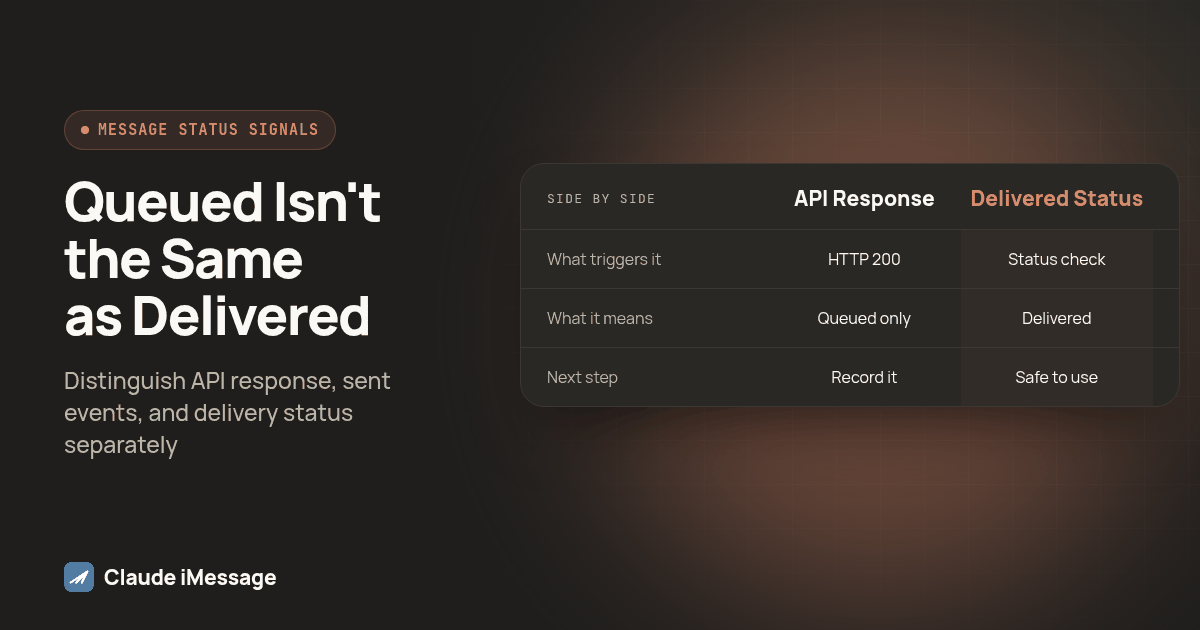
A 200 from a send call means the message is queued, not delivered. Delivered means a status check (or a reconciled message.sent webhook) confirms the network or device accepted it. Read, for an iMessage agent, is not a signal that exists at all in the webhook catalog, so a handler that waits on it is waiting on something that will never fire.
Beam is an independent messaging platform, not an Anthropic or Apple product.
What Does It Mean When the Send Call Itself Succeeds?
We hear some version of this question from nearly every developer wiring a Claude agent to send real texts: the send call came back clean, so why does the agent act like the message already landed? A successful API call, a delivered message and a read message are three separate facts, and treating them that way keeps an agent from retrying something that already worked or waiting forever on something that was never going to happen.
Beam is an independent messaging platform connecting iMessage, RCS and SMS fallback to a business number. It is not a feature of Anthropic's Claude or of Apple's Messages app, and the gap below sits in how any third party platform talks to a carrier network, not in the model making the decisions.
A send request against Beam's messages endpoint returns a 200 the moment the request is well formed and the recipient has not opted out. The body comes back as { "id": "41", "status": "queued", "to": "+1XXXXXXXXXX" } (a placeholder number, as in every example below), and that one word, queued, does more work than most agents give it credit for. It means accepted into a paced sending queue that protects the number from spam flags, nothing more.
A competing iMessage API vendor states the same distinction plainly: "A 200 means we accepted your request and queued it for processing. It does not mean the message reached a device" (Linq: message status webhooks, sent, delivered, failed). That line could describe almost any provider in this space, Beam included. An agent that marks a reminder sent the instant the HTTP call resolves is one retry bug away from a duplicate text.
How Do You Confirm a Message Actually Reached the Device?
The honest answer involves two mechanics, not one clean webhook. Beam's status progression runs queued, then sent, then delivered or failed, cancelled, or no_channel, living on the message object fetched with a call to Get a Message by id. A sent webhook fires the moment a message is handed to the network, covering the first touch, the inbox, the assistant or a direct API call. Sent is a waypoint, not the finish line.
Nothing in Beam's documented event catalog pushes a dedicated delivered event the instant a message lands. The way to get a confirmed delivered state is to poll that same message by id until its status moves past sent, or reconcile a batch of recent sends on a schedule rather than trusting the webhook stream alone for anything you cannot afford to miss. Beam's webhook delivery pushes once with no automatic retry, so a dropped delivery to your endpoint should never be the only thing standing between your agent and knowing a message landed.
The same competitor documentation draws the sent versus delivered line in almost identical terms: "One means we dispatched the message; the other means it arrived. Only the second is delivery" (Linq: message status webhooks). Build your reconciliation loop around that sentence and a network handoff will never pass for a confirmed arrival again.
Is There Really a Read Signal Anywhere in This Chain?
No, and this deserves a plain answer rather than a hedge. Beam does not infer an open rate for texts or invent a read status where no real event exists. Nothing in its event catalog fires when a contact opens a message, and that is a deliberate choice, not a gap waiting on a future release. A platform sitting in front of a provisioned number is not inside the handshake between two Apple IDs that Apple's own Messages app uses to show its blue "Read" label.
Some vendors document a message.read event in their own catalogs, and that event genuinely exists in at least one competitor's reference (Linq: webhook events reference). Treat that as a property of that vendor's own integration, not a guarantee every iMessage platform can offer, since a true read signal depends on access Apple does not formally document for third parties. The practical move for an agent built on Beam, or most hosted platforms, is to stop budgeting for a read event and start budgeting for a reply. Our guide on using read status for a follow up goes deeper on that substitution when the problem is timing, not detection.
What Should an Agent's Webhook Handler Do for Each Event?
Once the three signals are separated, the handler logic mostly writes itself. Here is the order we build it in for an agent that needs to know whether a text actually landed before deciding what to do next.
- Capture the id and the initial status from the send response, and store it against whatever record triggered the send, a reminder, an appointment confirmation, a follow up.
- On a message.sent webhook, update that record to reflect the network handoff, but do not treat the action tied to that message as confirmed yet.
- On a message.failed webhook, route immediately to a recovery path, a retry, a different channel, or a human alert, rather than letting a timer run out on a message that already died.
- For anything time sensitive enough to need proof of arrival, such as a one time passcode or a same day appointment reminder, call Get a Message and check for a delivered status before telling the rest of your system the job is done.
- On any message.received webhook tied to that phone number, treat the reply as the strongest available signal and cancel any pending follow up logic outright.
- On a contact.opted_out webhook, stop everything tied to that number immediately, since sending anything further after a STOP is a compliance problem, not a timing one.
Screenshot: a workspace's Event webhooks settings page with the signing secret visible, next to a small log table showing message.sent, message.failed and message.received rows for one phone number in time order, each tagged with the status it resolved to.
How Do the Three Signals Compare Side by Side?
| Signal | What fires it | What it actually confirms | What the agent should do |
|---|---|---|---|
| API call accepted | The synchronous 200 response from the send call | The request was well formed and queued | Record it as queued, not as sent or delivered |
| Network handoff | The message.sent webhook | The message left Beam for the carrier or Apple's network | Update status, keep waiting before confirming anything downstream |
| Delivered to device | A status check against Get a Message, or a reconciliation pass | The carrier or device accepted the message | Safe to confirm a time sensitive action, like a passcode or reminder |
| Failed | The message.failed webhook | The send did not go through | Route to retry, fallback channel, or a human, right away |
| Read | No event exists for this today | Nothing. There is no webhook to wait on | Stop waiting. Gate any follow up on a reply instead |
| Contact replied | The message.received webhook | A human actually engaged | Treat as the strongest signal available, cancel pending follow ups |
What Does a Minimal Reconciliation Loop Look Like in Code?
The handler itself stays small on purpose. A per message record built from the events you actually receive, plus one scheduled pass that checks anything still sitting in sent, covers the whole chain described above.
type BeamEvent = { id: string; type: string; data: Record<string, unknown> };
const sendRecords = new Map<string, { status: string; repliedPhone?: string }>();

function handleBeamEvent(event: BeamEvent) {
  const data = event.data as { id?: string; from?: string };
  if (event.type === "message.sent" || event.type === "message.failed") {
    sendRecords.set(String(data.id), { status: event.type === "message.sent" ? "sent" : "failed" });
  }
  if (event.type === "message.received") {
    for (const record of sendRecords.values()) record.repliedPhone = String(data.from);
  }
}

async function confirmDelivered(id: string): Promise<boolean> {
  const res = await fetch(`https://beam.aisync.link/v1/messages/${id}`, {
    headers: { "x-api-key": process.env.BEAM_KEY! },
  });
  const message = await res.json();
  if (message.status === "delivered") sendRecords.set(id, { status: "delivered" });
  return message.status === "delivered";
}
Notice what the code never does: it never checks for a read status, since no such field exists on the message object, and it never treats the send response as more than a starting point. Every state past that comes from a webhook that actually fired or a status check your own code made on purpose.
What Happens When the Recipient Falls Back to SMS?
Beam picks iMessage when the recipient's phone supports it and falls back to SMS automatically otherwise, so the same handler works for both without special casing. The status chain, queued, sent, delivered, failed, applies the same way regardless of channel. What changes is the ceiling: SMS has no read concept on any platform, so delivered is as far as the signal ever goes for a fallback contact, exactly as it already was for iMessage once the read event nobody ever got is out of the picture.
If your agent's channel field already drives tone or attachment handling elsewhere, reuse that field to decide how long a follow up waits, since there is no reason to hold a window open as long for a contact where no richer signal was ever coming.
What's the Procedure to Test This Before Real Contacts?
Run this sequence against a number you control before pointing any of the logic above at a real lead list.
- Send one test message and confirm the send response returns status queued, not delivered, and that your code records it that way rather than marking the action complete.
- Confirm a message.sent webhook arrives at your endpoint, and verify the signature before trusting the payload.
- Call Get a Message on that same id and confirm the status eventually reads delivered, then check that your code only confirms time sensitive actions once that call returns.
- Send a message to a number you then block or make unreachable, and confirm a message.failed webhook fires and your recovery path runs instead of a silent timeout.
- Reply to the test message from the recipient side and confirm the message.received webhook cancels any pending follow up in your test data.
- Kill your webhook endpoint for a minute, send a message during that window, and confirm your scheduled reconciliation pass still catches the eventual status once the endpoint comes back.
- Only move to real contacts once steps one through six each behaved the way this guide describes, with no step requiring you to guess at a read status that never showed up.
Which Signal Should Decide Whether the Agent Retries, Waits or Escalates?
Treat failed as the only signal that should trigger an automatic retry or a fallback channel, since it is the one event that tells you outright the message never had a chance. Treat delivered as the signal that clears anything time sensitive, a passcode, a same day reminder, a confirmation your workflow depends on. Treat a reply as the signal that cancels everything else, including any follow up a timer would otherwise fire. And stop building logic that waits on read, since waiting on an event that does not exist is indistinguishable from a bug until someone traces it back to this gap.
For the permission model behind read, send and status calls through MCP, our iMessage MCP server guide covers the setup this handler assumes is running. If your agent sends through the Claude Agent SDK rather than the REST API directly, our send_text tool guide covers the tool wrapper this loop sits behind. And if you are weighing whether to build this delivery layer yourself against Apple's own Messages app instead of a hosted API, our build your own iMessage API guide walks through what that version of the same problem costs to maintain.
A client line that stays blue with no visible delivery confirmation is a related but different problem, closer to the human side of this chain. Beam's guide to a stuck blue bubble with no Delivered line covers that diagnostic from inside the Messages app, useful when a team member, not your agent's code, is the one asking whether a text went through.
Before you connect
What do teams ask before they connect?
Does Beam send a webhook event when a message is delivered to the device?
No. Beam's webhook catalog covers a contact texting in, an outbound message going out, a failed send, an opt out, a booked appointment and a handoff to a human. Delivered is a status your own call to the Get a Message endpoint reports, not a push event Beam sends you on its own.
Is there a real webhook for read status on iMessage?
No. Beam does not invent an open or read status for text channels, and nothing in its event catalog fires when a contact opens a message. If your agent needs to time a follow up around engagement, our read receipts guide covers the practical substitute: gating on a reply instead of a read event that was never going to arrive.
How long does it take to add this delivery confirmation logic to an agent that already sends texts?
An afternoon for a developer who already has a send function working. Most of the work is adding a webhook receiver for message.sent and message.failed, then a status check call for anything that needs a confirmed delivered state before the agent moves on, like a time sensitive reminder.
Does Beam publish pricing for the webhook and status check calls used here?
No. Beam does not publish per call or per seat pricing on its site. Talk to the Beam team about the workflow you are building so they can scope the right plan and line for the volume you expect.
Does any of this change if the recipient falls back to SMS instead of iMessage?
The signals stay the same, queued, sent, delivered or failed, but the ceiling changes. SMS has no read concept on any platform, so an agent built around a reply as the engagement signal for iMessage should lean on that same reply signal even harder for an SMS fallback contact, since no richer status is coming.
Keep exploring
Which guides go deeper?
Where do these facts come from?
Checked November 2026.